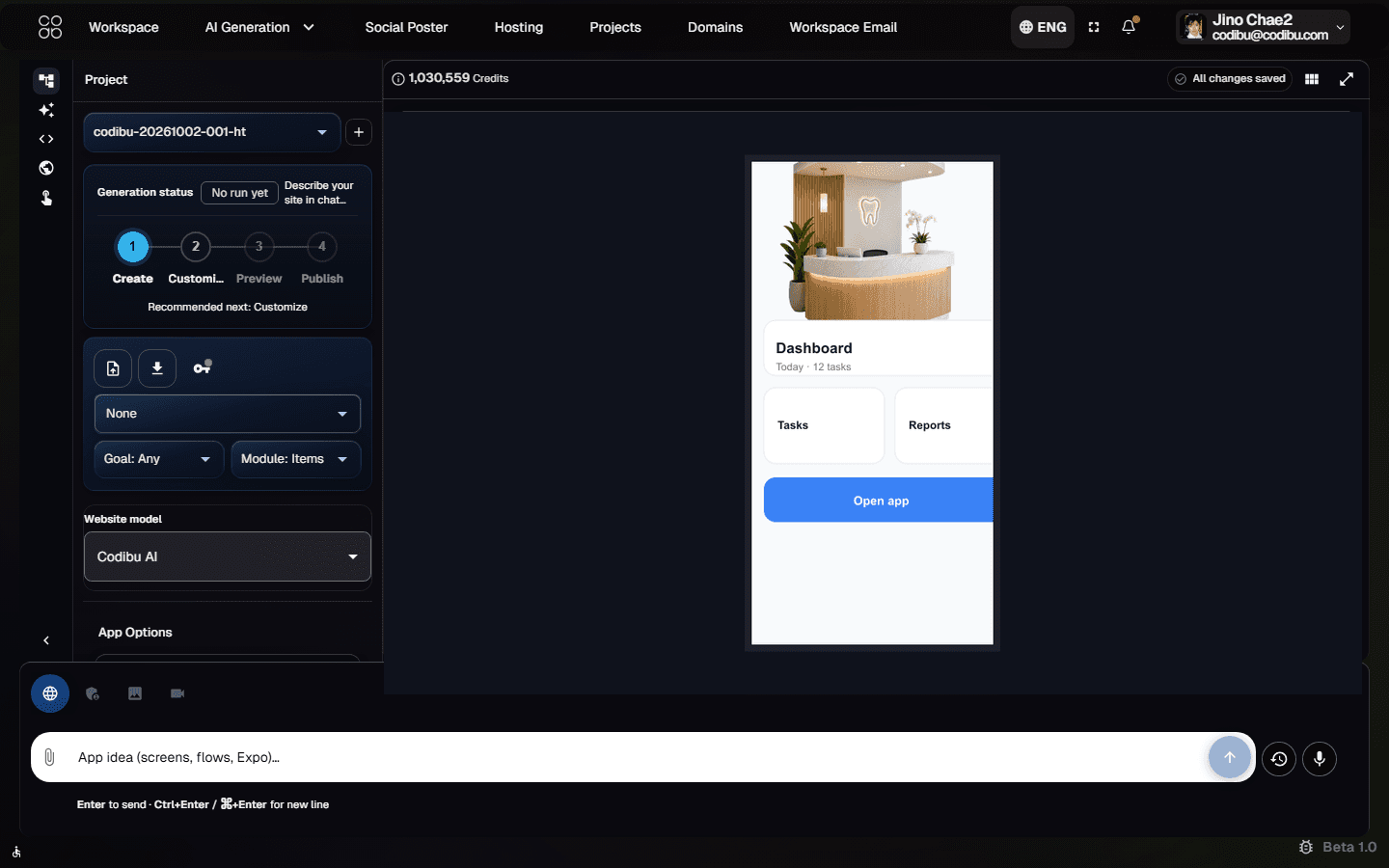
Draft app screens and structure from a prompt, then review and refine before development or preview. Use generated app drafts as a starting point for planning and iteration.
App mode opens in AI Chat. Sign in to save drafts, preview on device, and export when supported.
Product UI
App mode in AI Chat — prompt, screen list, and draft preview from the Codibu workspace.

Planning-ready app drafts you can review in the workspace—preview and export when supported, not a finished store app.
Screen drafts
Lists, forms, detail views, and tabs from your product brief—review before build.
Navigation planning
Stack or tab patterns drafted to match how users move through the app.
Auth planning (when needed)
Login, signup, and profile placeholders if your brief needs accounts—not production auth.
Expo preview (beta, when available)
Test on device with Expo Go while you iterate—availability depends on your draft and plan.
Exportable files (when ready)
Supported Expo and backend folders to hand off or continue locally.
Product UI
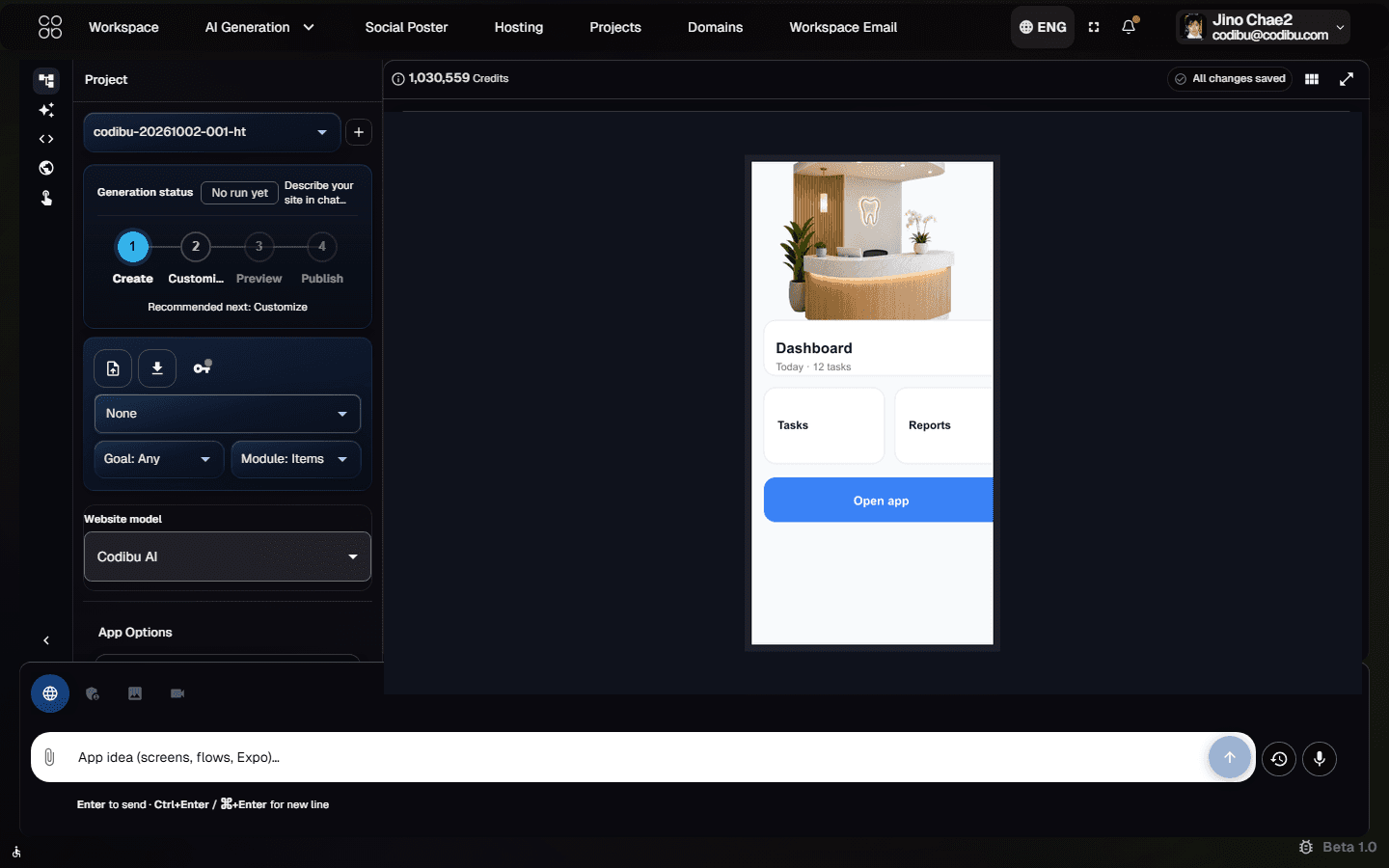
App mode in AI Chat — prompt, screen list, and draft preview from the Codibu workspace.

Product UI
Generated screen list and phone preview — review before export or handoff.

App mode focuses on planning-ready drafts—not a finished production app on day one:
Screen structure draft
Tab or stack navigation and screens from your brief—review in the workspace before you commit to build.
Starter backend scaffolding (when supported)
Optional app-api folders for lists and forms—verify scope in your draft; production backends may need additional setup.
Exportable source (when ready)
Download Expo project files when export is available—continue locally or hand off to a developer.
App mode fits service businesses and simple product flows—not every native feature on day one.
Booking & scheduling
Salons and clinics—calendar, reminders, and client profiles (e.g. Bloom Booking).
Ordering & menus
Restaurants and pickup—browse items, cart, and checkout screens (e.g. Cafe Pickup).
Internal dashboards
Team requests, status boards, and role-based views (e.g. Team Request App).
Customer portals
Account access, appointments, and updates (e.g. Clinic Portal).
When app mode generates UI, you get navigable screen drafts—not a single static marketing mockup.
Home dashboard with key actions and summaries
List and detail views for bookings, orders, or requests
Forms for signup, checkout, or profile updates—review before relying on them

When supported, Expo Go lets you run React Native drafts on a phone during development—no store listing required to test.
Scan a QR code with Expo Go on iOS or Android when preview is available
Check layout and navigation on a real device size
Iterate in AI Chat while you review the draft—not a production release step

Drafts live in Codibu so you can return, refine, and export—same place you manage websites and chat.
Draft history
Screens and structure persist between sessions when you are signed in.
Preview panel
Review generated UI before export or developer handoff.
Export readiness
Export when the flow matches your product story and supported outputs.
Open App mode in AI Chat
Go to AI Chat with mode=app or start from this page—describe users, screens, and core actions.
Describe screens and flows
Tell Codibu who the app serves, key screens, and what users should do—keep the first draft focused.
Preview and iterate
Review generated screens in the workspace preview; refine structure and copy in chat before export.
Export or hand off
When the draft matches your plan, export supported files or share with your team—store builds are separate.
Expo Go and export help you validate drafts—App Store and Play Store submission are not automatic.
Product UI
Export and project files when supported — not automatic App Store or Play Store release.

Expo Go (development preview)
When Expo preview is available, scan a QR code on your phone to walk through screens during iteration.
Export project files
Download supported Expo and backend folders to continue in your own repo or hand off to a developer.
Review on a real device
Use phone preview to check layout and navigation—not a substitute for full QA or store compliance.
Store release (your pipeline)
Codibu does not publish to app stores for you. EAS, signing, review, and compliance are your team’s work.
Advanced backend, payments, push notifications, app-store release, and custom integrations may require additional setup.
Best for & honest limits
Set expectations before you invest time in a draft.
What to expect
When you're ready, take the next step.
App mode drafts an Expo-style project with screens and navigation you can review in the workspace. Preview on a phone when Expo Go is supported; export when ready—not a guaranteed production app.
No. Start from App mode in AI Chat. Many teams pair an app draft with a marketing website later.
You may get exportable source and Expo Go for testing. Store submission is not automatic—you or your developer handle builds, signing, and review.
When export is available: supported Expo mobile folders and optional app-api scaffolding—enough to run locally or continue in your own Git repo after review.
No to start. Describe the product in chat. Developers can take over after export for custom native work or store builds.
Turn this into a live project in your account.
Screens from the Codibu workspace — draft, review, and export states you will use in your project.

App draft workspace
App mode · prompt · screen list
Codibu AI Chat in app mode — describe your product, review generated screens, and refine before preview or export. Not a decorative phone mockup.

Preview and export flow
Expo Go · project files · beta
Expo preview, generated files, and export steps when supported — additional setup may be required for store builds.
Draft app screens and structure from a prompt, then review and refine before development or preview. Use generated app drafts as a starting point for planning and iteration.
App mode opens in AI Chat. Sign in to save drafts, preview on device, and export when supported.
Product UI
App mode in AI Chat — prompt, screen list, and draft preview from the Codibu workspace.

Planning-ready app drafts you can review in the workspace—preview and export when supported, not a finished store app.
Screen drafts
Lists, forms, detail views, and tabs from your product brief—review before build.
Navigation planning
Stack or tab patterns drafted to match how users move through the app.
Auth planning (when needed)
Login, signup, and profile placeholders if your brief needs accounts—not production auth.
Expo preview (beta, when available)
Test on device with Expo Go while you iterate—availability depends on your draft and plan.
Exportable files (when ready)
Supported Expo and backend folders to hand off or continue locally.
Product UI
App mode in AI Chat — prompt, screen list, and draft preview from the Codibu workspace.

Product UI
Generated screen list and phone preview — review before export or handoff.

App mode focuses on planning-ready drafts—not a finished production app on day one:
Screen structure draft
Tab or stack navigation and screens from your brief—review in the workspace before you commit to build.
Starter backend scaffolding (when supported)
Optional app-api folders for lists and forms—verify scope in your draft; production backends may need additional setup.
Exportable source (when ready)
Download Expo project files when export is available—continue locally or hand off to a developer.
App mode fits service businesses and simple product flows—not every native feature on day one.
Booking & scheduling
Salons and clinics—calendar, reminders, and client profiles (e.g. Bloom Booking).
Ordering & menus
Restaurants and pickup—browse items, cart, and checkout screens (e.g. Cafe Pickup).
Internal dashboards
Team requests, status boards, and role-based views (e.g. Team Request App).
Customer portals
Account access, appointments, and updates (e.g. Clinic Portal).
When app mode generates UI, you get navigable screen drafts—not a single static marketing mockup.
Home dashboard with key actions and summaries
List and detail views for bookings, orders, or requests
Forms for signup, checkout, or profile updates—review before relying on them

When supported, Expo Go lets you run React Native drafts on a phone during development—no store listing required to test.
Scan a QR code with Expo Go on iOS or Android when preview is available
Check layout and navigation on a real device size
Iterate in AI Chat while you review the draft—not a production release step

Drafts live in Codibu so you can return, refine, and export—same place you manage websites and chat.
Draft history
Screens and structure persist between sessions when you are signed in.
Preview panel
Review generated UI before export or developer handoff.
Export readiness
Export when the flow matches your product story and supported outputs.
Open App mode in AI Chat
Go to AI Chat with mode=app or start from this page—describe users, screens, and core actions.
Describe screens and flows
Tell Codibu who the app serves, key screens, and what users should do—keep the first draft focused.
Preview and iterate
Review generated screens in the workspace preview; refine structure and copy in chat before export.
Export or hand off
When the draft matches your plan, export supported files or share with your team—store builds are separate.
Expo Go and export help you validate drafts—App Store and Play Store submission are not automatic.
Product UI
Export and project files when supported — not automatic App Store or Play Store release.

Expo Go (development preview)
When Expo preview is available, scan a QR code on your phone to walk through screens during iteration.
Export project files
Download supported Expo and backend folders to continue in your own repo or hand off to a developer.
Review on a real device
Use phone preview to check layout and navigation—not a substitute for full QA or store compliance.
Store release (your pipeline)
Codibu does not publish to app stores for you. EAS, signing, review, and compliance are your team’s work.
Advanced backend, payments, push notifications, app-store release, and custom integrations may require additional setup.
Best for & honest limits
Set expectations before you invest time in a draft.
What to expect
When you're ready, take the next step.
App mode drafts an Expo-style project with screens and navigation you can review in the workspace. Preview on a phone when Expo Go is supported; export when ready—not a guaranteed production app.
No. Start from App mode in AI Chat. Many teams pair an app draft with a marketing website later.
You may get exportable source and Expo Go for testing. Store submission is not automatic—you or your developer handle builds, signing, and review.
When export is available: supported Expo mobile folders and optional app-api scaffolding—enough to run locally or continue in your own Git repo after review.
No to start. Describe the product in chat. Developers can take over after export for custom native work or store builds.
Turn this into a live project in your account.
Screens from the Codibu workspace — draft, review, and export states you will use in your project.

App draft workspace
App mode · prompt · screen list
Codibu AI Chat in app mode — describe your product, review generated screens, and refine before preview or export. Not a decorative phone mockup.

Preview and export flow
Expo Go · project files · beta
Expo preview, generated files, and export steps when supported — additional setup may be required for store builds.