Search or connect a domain, review DNS requirements, and prepare launch settings before publishing. DNS and SSL status can vary depending on registrar, records, and hosting setup.
Sign in to search, connect, and manage domains in My Domains. Guests can try availability search above.
Live domain search
Enter a domain name to check availability
Checks availability via Codibu — register or connect after sign-in in My Domains.
Product UI screenshot · SSL and hosting readiness
Certificate and hosting readiness indicators — timing varies by registrar.

Guidance to search or connect a domain and track DNS and SSL readiness — timing varies by registrar.
Domain search
Check availability and add names to your account when supported.
DNS setup guidance
Plain-language record steps at your registrar — propagation takes time.
SSL and launch readiness
Certificate and go-live status in My Domains — not instant everywhere.
Connected website
Link the domain to a Codibu site or project when checks look right.
Renewal visibility
Ownership and renewal dates in My Domains when available for your registrar.
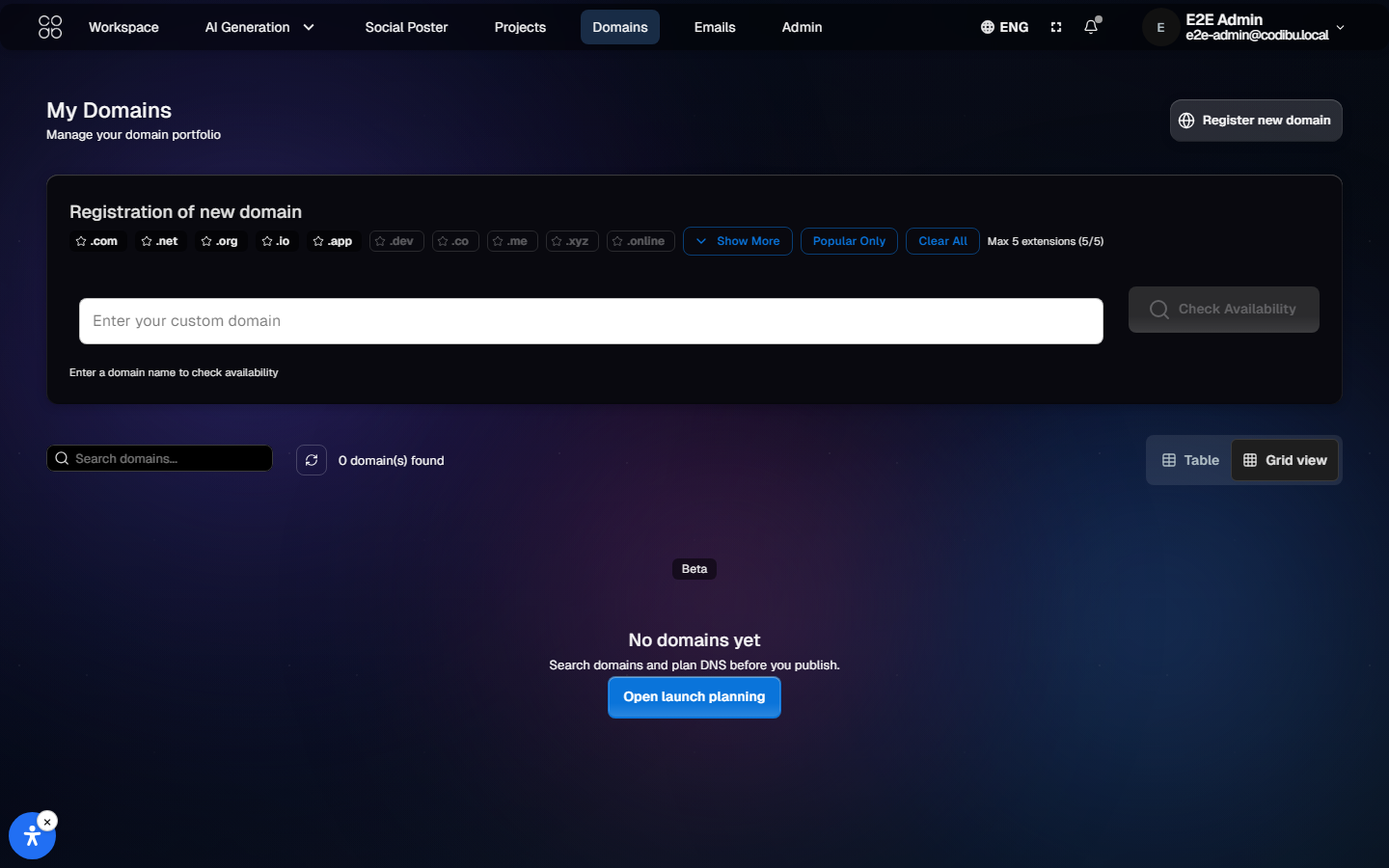
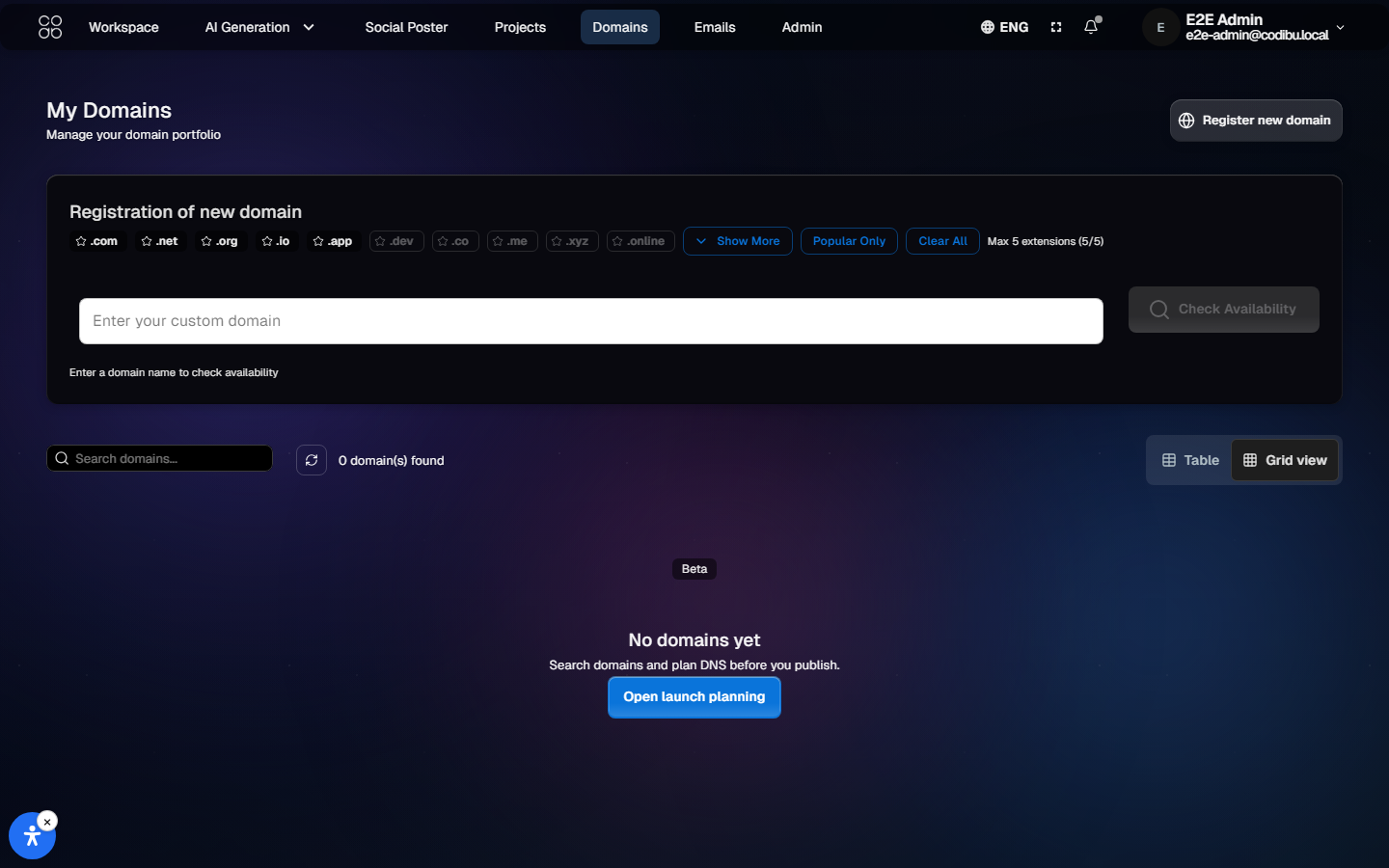
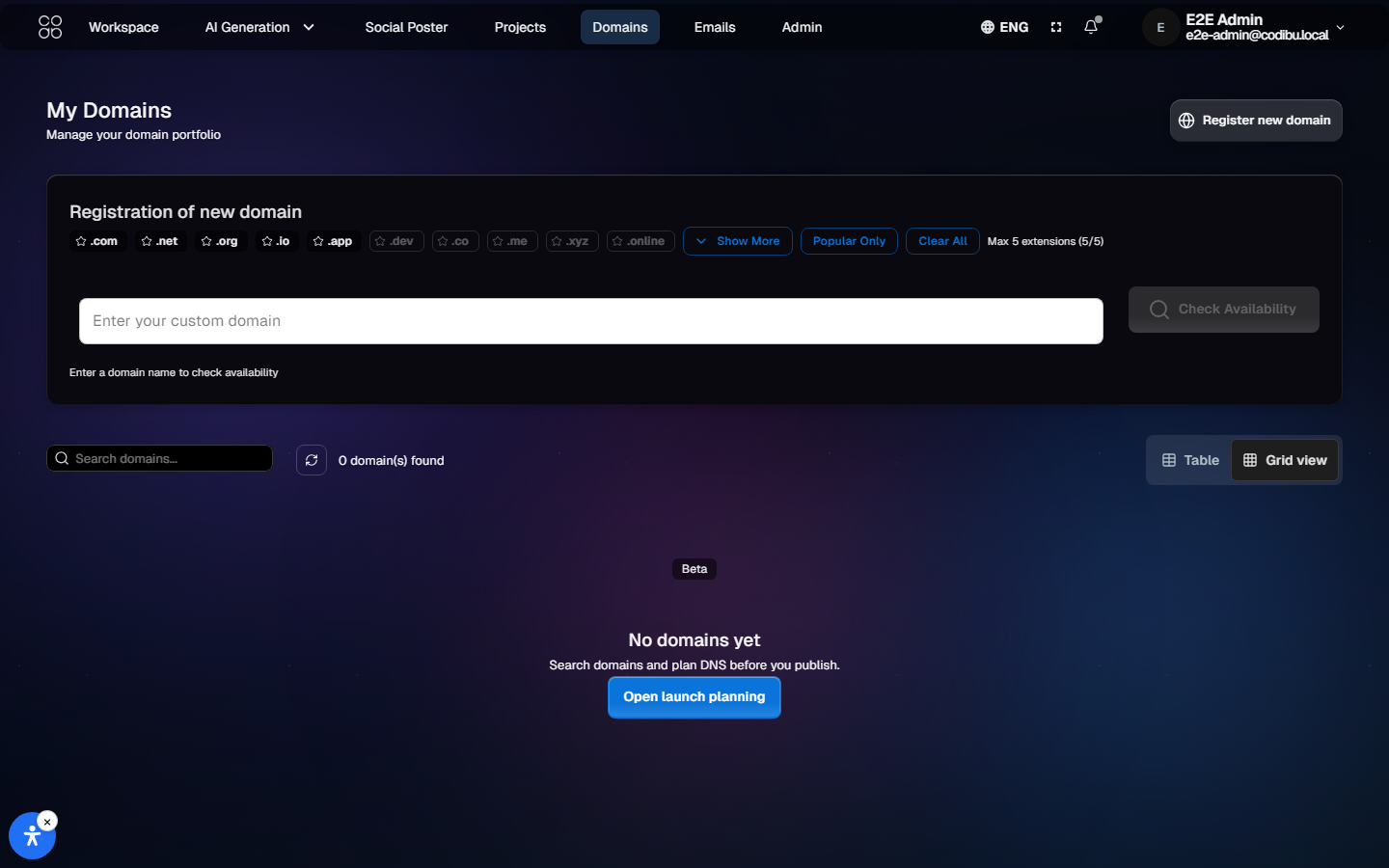
Product UI screenshot · Domain search dashboard
Search field, availability results, and domain list in My Domains.

Product UI screenshot · Domain detail
Connected domain overview with status and next steps.

Register a new domain
Search availability and register through Codibu when supported for your plan.
Connect a domain you own
Update DNS at your registrar using the records Codibu shows — transfer not required.
Use a temp address while you prep
Build on a Codibu URL until DNS and SSL checks look ready.
Review DNS steps
See pending vs verified for each record — propagation can take hours.
Domain launch
Search or connect a domain, review DNS requirements, confirm SSL readiness, then publish when checks look right.
Launch readiness varies
01
Search or connect
Find an available name or connect a domain you already own.
Search
02
Set DNS records
Add the records Codibu shows at your registrar — timing depends on provider.
DNS records
03
Review SSL
HTTPS usually follows DNS routing — status may stay pending until propagation finishes.
SSL check
04
Connect and publish
Link the domain to your website project and publish when readiness looks correct.
Publish
DNS often takes hours. Nameserver changes can take up to 48 hours. Your site may not show everywhere at once—that is normal.
Nameservers and records
Nameservers hold DNS. A, CNAME, MX, and TXT point traffic and mail. The app shows what to paste at your registrar.
Propagation
Networks update at different speeds. Waiting is not the same as broken.
SSL
SSL completes after DNS routes here. Pending until then.
Product UI screenshot · DNS records
Record types, values, and verification status in the product.

Example record layout
Illustrative demo rows for demo-business.com — not live customer DNS.
| Type | Name | Value | Status |
|---|---|---|---|
| A | @ | 203.0.113.10 | Verified |
| CNAME | www | demo-business.com | Pending |
| TXT | _codibu | codibu-verify=•••••••• | Pending |
A
Name: @
203.0.113.10
CNAME
Name: www
demo-business.com
TXT
Name: _codibu
codibu-verify=••••••••
Codibu helps guide setup and keeps launch readiness visible — timing still depends on DNS and SSL.
Hosting connection
Point the domain at the site or project you plan to publish.
SSL
HTTPS may stay pending until DNS routes correctly — not guaranteed immediately.
Status on screen
Watch DNS and SSL in My Domains instead of guessing at registrar panels.
Signed-in management
After sign-in, update DNS assignments and connected projects in My Domains.
Product UI screenshot · Launch readiness
DNS, SSL, and connected project status in My Domains — review before publish.

Pick how you build
AI Chat, template, or draft—then aim for launch.
Domain
New name, yours, or temp URL until DNS is set.
Hosting
Attach the domain to the site you publish.
After launch
Track DNS and SSL. Edit records from one place.
DNS propagation often takes hours and varies by registrar. SSL follows routing — Codibu shows status, not instant worldwide guarantees.
Many teams build pages while DNS propagates. When the site is ready, connect the domain from My Domains — or start in the website builder if design comes first.
Ownership, renewals, and launch prep—without cloud jargon or guesswork.
You own the domain
Registration stays in your account at the registrar. Codibu connects the domain to your site — you can move DNS elsewhere when needed.
Renewals with reminders
Renewal options and reminders depend on registrar and plan — check My Domains for your dates.
Launch checklist on screen
Domain, DNS, SSL, and publish steps show as checklist items when supported — pending does not mean broken.
When you're ready, take the next step.
Turn this into a live project in your account.
Screens from the Codibu workspace — draft, review, and export states you will use in your project.

Domain search dashboard
Search · availability · list
The Codibu My Domains screen — search field, availability results, and connected domain list. Not a website builder mock.

DNS and SSL readiness
Records · certificate · hosting status
DNS records, SSL status, and launch readiness in the product — timing varies by registrar and records.
Search or connect a domain, review DNS requirements, and prepare launch settings before publishing. DNS and SSL status can vary depending on registrar, records, and hosting setup.
Sign in to search, connect, and manage domains in My Domains. Guests can try availability search above.
Live domain search
Enter a domain name to check availability
Checks availability via Codibu — register or connect after sign-in in My Domains.
Product UI screenshot · SSL and hosting readiness
Certificate and hosting readiness indicators — timing varies by registrar.

Guidance to search or connect a domain and track DNS and SSL readiness — timing varies by registrar.
Domain search
Check availability and add names to your account when supported.
DNS setup guidance
Plain-language record steps at your registrar — propagation takes time.
SSL and launch readiness
Certificate and go-live status in My Domains — not instant everywhere.
Connected website
Link the domain to a Codibu site or project when checks look right.
Renewal visibility
Ownership and renewal dates in My Domains when available for your registrar.
Product UI screenshot · Domain search dashboard
Search field, availability results, and domain list in My Domains.

Product UI screenshot · Domain detail
Connected domain overview with status and next steps.

Register a new domain
Search availability and register through Codibu when supported for your plan.
Connect a domain you own
Update DNS at your registrar using the records Codibu shows — transfer not required.
Use a temp address while you prep
Build on a Codibu URL until DNS and SSL checks look ready.
Review DNS steps
See pending vs verified for each record — propagation can take hours.
Domain launch
Search or connect a domain, review DNS requirements, confirm SSL readiness, then publish when checks look right.
Launch readiness varies
01
Search or connect
Find an available name or connect a domain you already own.
Search
02
Set DNS records
Add the records Codibu shows at your registrar — timing depends on provider.
DNS records
03
Review SSL
HTTPS usually follows DNS routing — status may stay pending until propagation finishes.
SSL check
04
Connect and publish
Link the domain to your website project and publish when readiness looks correct.
Publish
DNS often takes hours. Nameserver changes can take up to 48 hours. Your site may not show everywhere at once—that is normal.
Nameservers and records
Nameservers hold DNS. A, CNAME, MX, and TXT point traffic and mail. The app shows what to paste at your registrar.
Propagation
Networks update at different speeds. Waiting is not the same as broken.
SSL
SSL completes after DNS routes here. Pending until then.
Product UI screenshot · DNS records
Record types, values, and verification status in the product.

Example record layout
Illustrative demo rows for demo-business.com — not live customer DNS.
| Type | Name | Value | Status |
|---|---|---|---|
| A | @ | 203.0.113.10 | Verified |
| CNAME | www | demo-business.com | Pending |
| TXT | _codibu | codibu-verify=•••••••• | Pending |
A
Name: @
203.0.113.10
CNAME
Name: www
demo-business.com
TXT
Name: _codibu
codibu-verify=••••••••
Codibu helps guide setup and keeps launch readiness visible — timing still depends on DNS and SSL.
Hosting connection
Point the domain at the site or project you plan to publish.
SSL
HTTPS may stay pending until DNS routes correctly — not guaranteed immediately.
Status on screen
Watch DNS and SSL in My Domains instead of guessing at registrar panels.
Signed-in management
After sign-in, update DNS assignments and connected projects in My Domains.
Product UI screenshot · Launch readiness
DNS, SSL, and connected project status in My Domains — review before publish.

Pick how you build
AI Chat, template, or draft—then aim for launch.
Domain
New name, yours, or temp URL until DNS is set.
Hosting
Attach the domain to the site you publish.
After launch
Track DNS and SSL. Edit records from one place.
DNS propagation often takes hours and varies by registrar. SSL follows routing — Codibu shows status, not instant worldwide guarantees.
Many teams build pages while DNS propagates. When the site is ready, connect the domain from My Domains — or start in the website builder if design comes first.
Ownership, renewals, and launch prep—without cloud jargon or guesswork.
You own the domain
Registration stays in your account at the registrar. Codibu connects the domain to your site — you can move DNS elsewhere when needed.
Renewals with reminders
Renewal options and reminders depend on registrar and plan — check My Domains for your dates.
Launch checklist on screen
Domain, DNS, SSL, and publish steps show as checklist items when supported — pending does not mean broken.
When you're ready, take the next step.
Turn this into a live project in your account.
Screens from the Codibu workspace — draft, review, and export states you will use in your project.

Domain search dashboard
Search · availability · list
The Codibu My Domains screen — search field, availability results, and connected domain list. Not a website builder mock.

DNS and SSL readiness
Records · certificate · hosting status
DNS records, SSL status, and launch readiness in the product — timing varies by registrar and records.
Search or connect a domain, review DNS requirements, and prepare launch settings before publishing. DNS and SSL status can vary depending on registrar, records, and hosting setup.
Sign in to search, connect, and manage domains in My Domains. Guests can try availability search above.
Live domain search
Enter a domain name to check availability
Checks availability via Codibu — register or connect after sign-in in My Domains.
Product UI screenshot · SSL and hosting readiness
Certificate and hosting readiness indicators — timing varies by registrar.

Guidance to search or connect a domain and track DNS and SSL readiness — timing varies by registrar.
Domain search
Check availability and add names to your account when supported.
DNS setup guidance
Plain-language record steps at your registrar — propagation takes time.
SSL and launch readiness
Certificate and go-live status in My Domains — not instant everywhere.
Connected website
Link the domain to a Codibu site or project when checks look right.
Renewal visibility
Ownership and renewal dates in My Domains when available for your registrar.
Product UI screenshot · Domain search dashboard
Search field, availability results, and domain list in My Domains.

Product UI screenshot · Domain detail
Connected domain overview with status and next steps.

Register a new domain
Search availability and register through Codibu when supported for your plan.
Connect a domain you own
Update DNS at your registrar using the records Codibu shows — transfer not required.
Use a temp address while you prep
Build on a Codibu URL until DNS and SSL checks look ready.
Review DNS steps
See pending vs verified for each record — propagation can take hours.
Domain launch
Search or connect a domain, review DNS requirements, confirm SSL readiness, then publish when checks look right.
Launch readiness varies
01
Search or connect
Find an available name or connect a domain you already own.
Search
02
Set DNS records
Add the records Codibu shows at your registrar — timing depends on provider.
DNS records
03
Review SSL
HTTPS usually follows DNS routing — status may stay pending until propagation finishes.
SSL check
04
Connect and publish
Link the domain to your website project and publish when readiness looks correct.
Publish
DNS often takes hours. Nameserver changes can take up to 48 hours. Your site may not show everywhere at once—that is normal.
Nameservers and records
Nameservers hold DNS. A, CNAME, MX, and TXT point traffic and mail. The app shows what to paste at your registrar.
Propagation
Networks update at different speeds. Waiting is not the same as broken.
SSL
SSL completes after DNS routes here. Pending until then.
Product UI screenshot · DNS records
Record types, values, and verification status in the product.

Example record layout
Illustrative demo rows for demo-business.com — not live customer DNS.
| Type | Name | Value | Status |
|---|---|---|---|
| A | @ | 203.0.113.10 | Verified |
| CNAME | www | demo-business.com | Pending |
| TXT | _codibu | codibu-verify=•••••••• | Pending |
A
Name: @
203.0.113.10
CNAME
Name: www
demo-business.com
TXT
Name: _codibu
codibu-verify=••••••••
Codibu helps guide setup and keeps launch readiness visible — timing still depends on DNS and SSL.
Hosting connection
Point the domain at the site or project you plan to publish.
SSL
HTTPS may stay pending until DNS routes correctly — not guaranteed immediately.
Status on screen
Watch DNS and SSL in My Domains instead of guessing at registrar panels.
Signed-in management
After sign-in, update DNS assignments and connected projects in My Domains.
Product UI screenshot · Launch readiness
DNS, SSL, and connected project status in My Domains — review before publish.

Pick how you build
AI Chat, template, or draft—then aim for launch.
Domain
New name, yours, or temp URL until DNS is set.
Hosting
Attach the domain to the site you publish.
After launch
Track DNS and SSL. Edit records from one place.
DNS propagation often takes hours and varies by registrar. SSL follows routing — Codibu shows status, not instant worldwide guarantees.
Many teams build pages while DNS propagates. When the site is ready, connect the domain from My Domains — or start in the website builder if design comes first.
Ownership, renewals, and launch prep—without cloud jargon or guesswork.
You own the domain
Registration stays in your account at the registrar. Codibu connects the domain to your site — you can move DNS elsewhere when needed.
Renewals with reminders
Renewal options and reminders depend on registrar and plan — check My Domains for your dates.
Launch checklist on screen
Domain, DNS, SSL, and publish steps show as checklist items when supported — pending does not mean broken.
When you're ready, take the next step.
Turn this into a live project in your account.
Screens from the Codibu workspace — draft, review, and export states you will use in your project.

Domain search dashboard
Search · availability · list
The Codibu My Domains screen — search field, availability results, and connected domain list. Not a website builder mock.

DNS and SSL readiness
Records · certificate · hosting status
DNS records, SSL status, and launch readiness in the product — timing varies by registrar and records.
Search or connect a domain, review DNS requirements, and prepare launch settings before publishing. DNS and SSL status can vary depending on registrar, records, and hosting setup.
Sign in to search, connect, and manage domains in My Domains. Guests can try availability search above.
Live domain search
Enter a domain name to check availability
Checks availability via Codibu — register or connect after sign-in in My Domains.
Product UI screenshot · SSL and hosting readiness
Certificate and hosting readiness indicators — timing varies by registrar.

Guidance to search or connect a domain and track DNS and SSL readiness — timing varies by registrar.
Domain search
Check availability and add names to your account when supported.
DNS setup guidance
Plain-language record steps at your registrar — propagation takes time.
SSL and launch readiness
Certificate and go-live status in My Domains — not instant everywhere.
Connected website
Link the domain to a Codibu site or project when checks look right.
Renewal visibility
Ownership and renewal dates in My Domains when available for your registrar.
Product UI screenshot · Domain search dashboard
Search field, availability results, and domain list in My Domains.

Product UI screenshot · Domain detail
Connected domain overview with status and next steps.

Register a new domain
Search availability and register through Codibu when supported for your plan.
Connect a domain you own
Update DNS at your registrar using the records Codibu shows — transfer not required.
Use a temp address while you prep
Build on a Codibu URL until DNS and SSL checks look ready.
Review DNS steps
See pending vs verified for each record — propagation can take hours.
Domain launch
Search or connect a domain, review DNS requirements, confirm SSL readiness, then publish when checks look right.
Launch readiness varies
01
Search or connect
Find an available name or connect a domain you already own.
Search
02
Set DNS records
Add the records Codibu shows at your registrar — timing depends on provider.
DNS records
03
Review SSL
HTTPS usually follows DNS routing — status may stay pending until propagation finishes.
SSL check
04
Connect and publish
Link the domain to your website project and publish when readiness looks correct.
Publish
DNS often takes hours. Nameserver changes can take up to 48 hours. Your site may not show everywhere at once—that is normal.
Nameservers and records
Nameservers hold DNS. A, CNAME, MX, and TXT point traffic and mail. The app shows what to paste at your registrar.
Propagation
Networks update at different speeds. Waiting is not the same as broken.
SSL
SSL completes after DNS routes here. Pending until then.
Product UI screenshot · DNS records
Record types, values, and verification status in the product.

Example record layout
Illustrative demo rows for demo-business.com — not live customer DNS.
| Type | Name | Value | Status |
|---|---|---|---|
| A | @ | 203.0.113.10 | Verified |
| CNAME | www | demo-business.com | Pending |
| TXT | _codibu | codibu-verify=•••••••• | Pending |
A
Name: @
203.0.113.10
CNAME
Name: www
demo-business.com
TXT
Name: _codibu
codibu-verify=••••••••
Codibu helps guide setup and keeps launch readiness visible — timing still depends on DNS and SSL.
Hosting connection
Point the domain at the site or project you plan to publish.
SSL
HTTPS may stay pending until DNS routes correctly — not guaranteed immediately.
Status on screen
Watch DNS and SSL in My Domains instead of guessing at registrar panels.
Signed-in management
After sign-in, update DNS assignments and connected projects in My Domains.
Product UI screenshot · Launch readiness
DNS, SSL, and connected project status in My Domains — review before publish.

Pick how you build
AI Chat, template, or draft—then aim for launch.
Domain
New name, yours, or temp URL until DNS is set.
Hosting
Attach the domain to the site you publish.
After launch
Track DNS and SSL. Edit records from one place.
DNS propagation often takes hours and varies by registrar. SSL follows routing — Codibu shows status, not instant worldwide guarantees.
Many teams build pages while DNS propagates. When the site is ready, connect the domain from My Domains — or start in the website builder if design comes first.
Ownership, renewals, and launch prep—without cloud jargon or guesswork.
You own the domain
Registration stays in your account at the registrar. Codibu connects the domain to your site — you can move DNS elsewhere when needed.
Renewals with reminders
Renewal options and reminders depend on registrar and plan — check My Domains for your dates.
Launch checklist on screen
Domain, DNS, SSL, and publish steps show as checklist items when supported — pending does not mean broken.
When you're ready, take the next step.
Turn this into a live project in your account.
Screens from the Codibu workspace — draft, review, and export states you will use in your project.

Domain search dashboard
Search · availability · list
The Codibu My Domains screen — search field, availability results, and connected domain list. Not a website builder mock.

DNS and SSL readiness
Records · certificate · hosting status
DNS records, SSL status, and launch readiness in the product — timing varies by registrar and records.
Search or connect a domain, review DNS requirements, and prepare launch settings before publishing. DNS and SSL status can vary depending on registrar, records, and hosting setup.
Sign in to search, connect, and manage domains in My Domains. Guests can try availability search above.
Live domain search
Enter a domain name to check availability
Checks availability via Codibu — register or connect after sign-in in My Domains.
Product UI screenshot · SSL and hosting readiness
Certificate and hosting readiness indicators — timing varies by registrar.

Guidance to search or connect a domain and track DNS and SSL readiness — timing varies by registrar.
Domain search
Check availability and add names to your account when supported.
DNS setup guidance
Plain-language record steps at your registrar — propagation takes time.
SSL and launch readiness
Certificate and go-live status in My Domains — not instant everywhere.
Connected website
Link the domain to a Codibu site or project when checks look right.
Renewal visibility
Ownership and renewal dates in My Domains when available for your registrar.
Product UI screenshot · Domain search dashboard
Search field, availability results, and domain list in My Domains.

Product UI screenshot · Domain detail
Connected domain overview with status and next steps.

Register a new domain
Search availability and register through Codibu when supported for your plan.
Connect a domain you own
Update DNS at your registrar using the records Codibu shows — transfer not required.
Use a temp address while you prep
Build on a Codibu URL until DNS and SSL checks look ready.
Review DNS steps
See pending vs verified for each record — propagation can take hours.
Domain launch
Search or connect a domain, review DNS requirements, confirm SSL readiness, then publish when checks look right.
Launch readiness varies
01
Search or connect
Find an available name or connect a domain you already own.
Search
02
Set DNS records
Add the records Codibu shows at your registrar — timing depends on provider.
DNS records
03
Review SSL
HTTPS usually follows DNS routing — status may stay pending until propagation finishes.
SSL check
04
Connect and publish
Link the domain to your website project and publish when readiness looks correct.
Publish
DNS often takes hours. Nameserver changes can take up to 48 hours. Your site may not show everywhere at once—that is normal.
Nameservers and records
Nameservers hold DNS. A, CNAME, MX, and TXT point traffic and mail. The app shows what to paste at your registrar.
Propagation
Networks update at different speeds. Waiting is not the same as broken.
SSL
SSL completes after DNS routes here. Pending until then.
Product UI screenshot · DNS records
Record types, values, and verification status in the product.

Example record layout
Illustrative demo rows for demo-business.com — not live customer DNS.
| Type | Name | Value | Status |
|---|---|---|---|
| A | @ | 203.0.113.10 | Verified |
| CNAME | www | demo-business.com | Pending |
| TXT | _codibu | codibu-verify=•••••••• | Pending |
A
Name: @
203.0.113.10
CNAME
Name: www
demo-business.com
TXT
Name: _codibu
codibu-verify=••••••••
Codibu helps guide setup and keeps launch readiness visible — timing still depends on DNS and SSL.
Hosting connection
Point the domain at the site or project you plan to publish.
SSL
HTTPS may stay pending until DNS routes correctly — not guaranteed immediately.
Status on screen
Watch DNS and SSL in My Domains instead of guessing at registrar panels.
Signed-in management
After sign-in, update DNS assignments and connected projects in My Domains.
Product UI screenshot · Launch readiness
DNS, SSL, and connected project status in My Domains — review before publish.

Pick how you build
AI Chat, template, or draft—then aim for launch.
Domain
New name, yours, or temp URL until DNS is set.
Hosting
Attach the domain to the site you publish.
After launch
Track DNS and SSL. Edit records from one place.
DNS propagation often takes hours and varies by registrar. SSL follows routing — Codibu shows status, not instant worldwide guarantees.
Many teams build pages while DNS propagates. When the site is ready, connect the domain from My Domains — or start in the website builder if design comes first.
Ownership, renewals, and launch prep—without cloud jargon or guesswork.
You own the domain
Registration stays in your account at the registrar. Codibu connects the domain to your site — you can move DNS elsewhere when needed.
Renewals with reminders
Renewal options and reminders depend on registrar and plan — check My Domains for your dates.
Launch checklist on screen
Domain, DNS, SSL, and publish steps show as checklist items when supported — pending does not mean broken.
When you're ready, take the next step.
Turn this into a live project in your account.
Screens from the Codibu workspace — draft, review, and export states you will use in your project.

Domain search dashboard
Search · availability · list
The Codibu My Domains screen — search field, availability results, and connected domain list. Not a website builder mock.

DNS and SSL readiness
Records · certificate · hosting status
DNS records, SSL status, and launch readiness in the product — timing varies by registrar and records.
Search or connect a domain, review DNS requirements, and prepare launch settings before publishing. DNS and SSL status can vary depending on registrar, records, and hosting setup.
Sign in to search, connect, and manage domains in My Domains. Guests can try availability search above.
Live domain search
Enter a domain name to check availability
Checks availability via Codibu — register or connect after sign-in in My Domains.
Product UI screenshot · SSL and hosting readiness
Certificate and hosting readiness indicators — timing varies by registrar.

Guidance to search or connect a domain and track DNS and SSL readiness — timing varies by registrar.
Domain search
Check availability and add names to your account when supported.
DNS setup guidance
Plain-language record steps at your registrar — propagation takes time.
SSL and launch readiness
Certificate and go-live status in My Domains — not instant everywhere.
Connected website
Link the domain to a Codibu site or project when checks look right.
Renewal visibility
Ownership and renewal dates in My Domains when available for your registrar.
Product UI screenshot · Domain search dashboard
Search field, availability results, and domain list in My Domains.

Product UI screenshot · Domain detail
Connected domain overview with status and next steps.

Register a new domain
Search availability and register through Codibu when supported for your plan.
Connect a domain you own
Update DNS at your registrar using the records Codibu shows — transfer not required.
Use a temp address while you prep
Build on a Codibu URL until DNS and SSL checks look ready.
Review DNS steps
See pending vs verified for each record — propagation can take hours.
Domain launch
Search or connect a domain, review DNS requirements, confirm SSL readiness, then publish when checks look right.
Launch readiness varies
01
Search or connect
Find an available name or connect a domain you already own.
Search
02
Set DNS records
Add the records Codibu shows at your registrar — timing depends on provider.
DNS records
03
Review SSL
HTTPS usually follows DNS routing — status may stay pending until propagation finishes.
SSL check
04
Connect and publish
Link the domain to your website project and publish when readiness looks correct.
Publish
DNS often takes hours. Nameserver changes can take up to 48 hours. Your site may not show everywhere at once—that is normal.
Nameservers and records
Nameservers hold DNS. A, CNAME, MX, and TXT point traffic and mail. The app shows what to paste at your registrar.
Propagation
Networks update at different speeds. Waiting is not the same as broken.
SSL
SSL completes after DNS routes here. Pending until then.
Product UI screenshot · DNS records
Record types, values, and verification status in the product.

Example record layout
Illustrative demo rows for demo-business.com — not live customer DNS.
| Type | Name | Value | Status |
|---|---|---|---|
| A | @ | 203.0.113.10 | Verified |
| CNAME | www | demo-business.com | Pending |
| TXT | _codibu | codibu-verify=•••••••• | Pending |
A
Name: @
203.0.113.10
CNAME
Name: www
demo-business.com
TXT
Name: _codibu
codibu-verify=••••••••
Codibu helps guide setup and keeps launch readiness visible — timing still depends on DNS and SSL.
Hosting connection
Point the domain at the site or project you plan to publish.
SSL
HTTPS may stay pending until DNS routes correctly — not guaranteed immediately.
Status on screen
Watch DNS and SSL in My Domains instead of guessing at registrar panels.
Signed-in management
After sign-in, update DNS assignments and connected projects in My Domains.
Product UI screenshot · Launch readiness
DNS, SSL, and connected project status in My Domains — review before publish.

Pick how you build
AI Chat, template, or draft—then aim for launch.
Domain
New name, yours, or temp URL until DNS is set.
Hosting
Attach the domain to the site you publish.
After launch
Track DNS and SSL. Edit records from one place.
DNS propagation often takes hours and varies by registrar. SSL follows routing — Codibu shows status, not instant worldwide guarantees.
Many teams build pages while DNS propagates. When the site is ready, connect the domain from My Domains — or start in the website builder if design comes first.
Ownership, renewals, and launch prep—without cloud jargon or guesswork.
You own the domain
Registration stays in your account at the registrar. Codibu connects the domain to your site — you can move DNS elsewhere when needed.
Renewals with reminders
Renewal options and reminders depend on registrar and plan — check My Domains for your dates.
Launch checklist on screen
Domain, DNS, SSL, and publish steps show as checklist items when supported — pending does not mean broken.
When you're ready, take the next step.
Turn this into a live project in your account.
Screens from the Codibu workspace — draft, review, and export states you will use in your project.

Domain search dashboard
Search · availability · list
The Codibu My Domains screen — search field, availability results, and connected domain list. Not a website builder mock.

DNS and SSL readiness
Records · certificate · hosting status
DNS records, SSL status, and launch readiness in the product — timing varies by registrar and records.