Find answers by topic, review setup guides, and contact support when you need help. FAQ pages help customers understand AI creation, websites, domains, pricing, and support paths.
For account-specific issues, sign in or use Help Center support — response times are not guaranteed.
Filters the FAQ list below — for the full Help Center search, open Browse FAQs.
Product UI
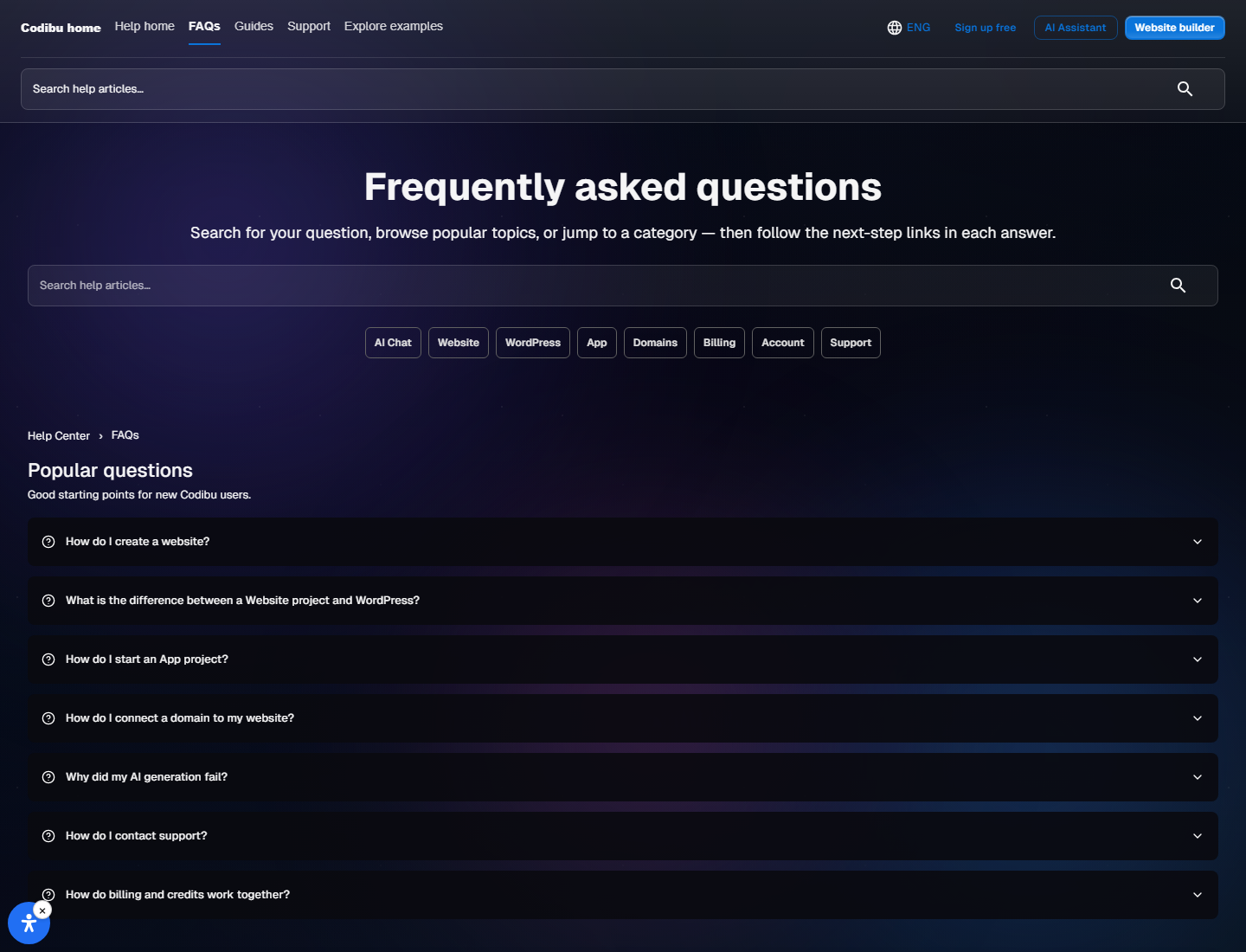
Help Center FAQ search with categories and popular questions — not a CMS dashboard mock.

Topic-grouped answers and routes to Help Center—not an FAQ builder product.
Categorized answers
AI, website, domains, pricing, account, and support topics.
Popular questions
Common starting points before you open a product area.
Page filter
Keyword filter for questions on this page; full search lives in Help Center.
Support path
Guides, FAQs, and contact support when self-serve is not enough.
Product UI
Help Center FAQ search with categories and popular questions — not a CMS dashboard mock.

Product UI
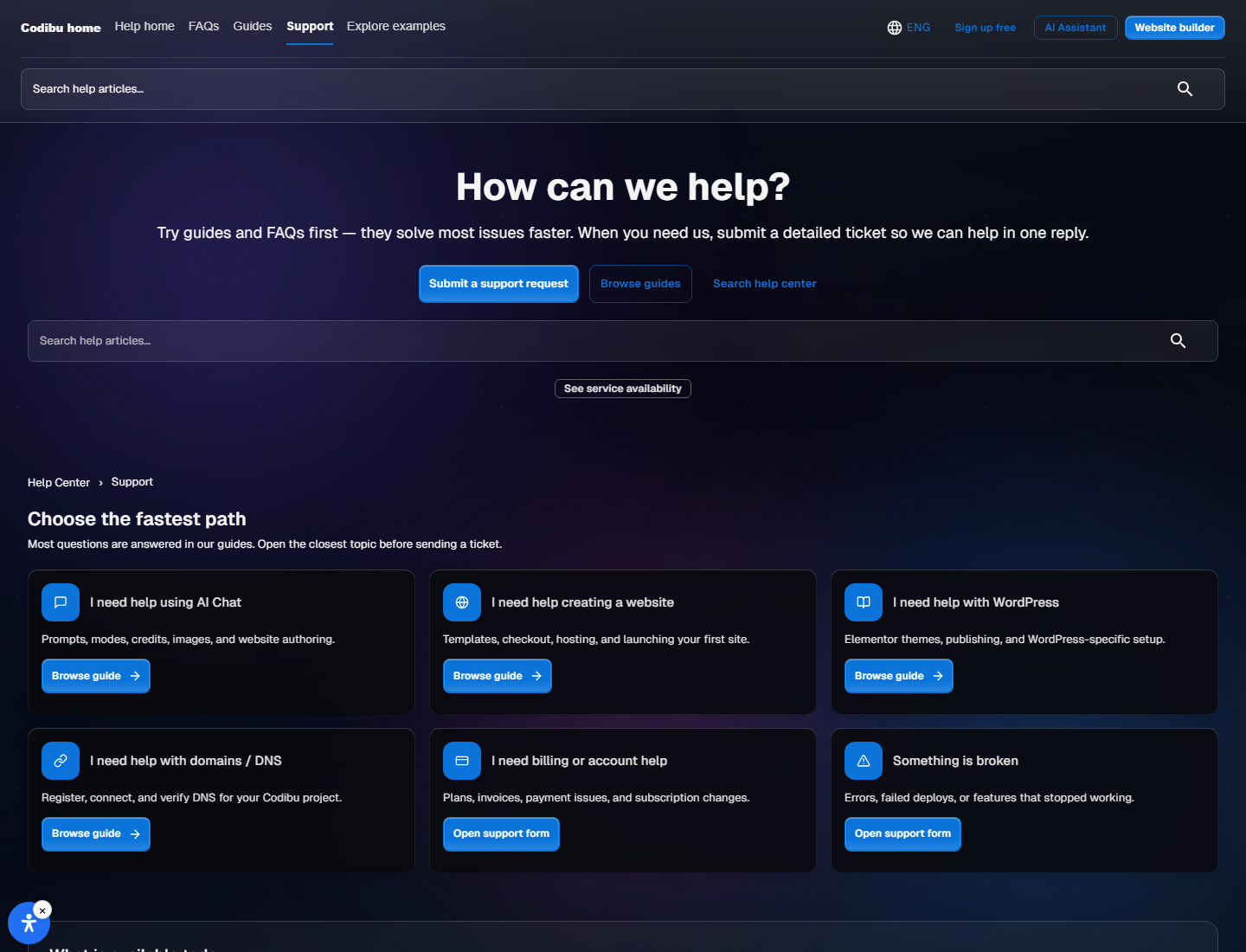
Support contact flow with form and product status — account review may require sign-in.

The questions people ask most, with straight answers:
No. Describe what you need and get drafts and layouts you can edit yourself.
Yes. Draft in AI Chat, preview, edit, then connect your domain and hosting.
Yes. Connect a domain you already own or buy a new one inside Codibu.
Yes. Keep editing SEO, pages, and content after you go live.
No. Simple sites can stay as fast HTML. Choose WordPress when you need a blog or full CMS.
Copy, landing blocks, product shots, edits, short motion clips, and campaign assets — review outputs before publishing.
Use static HTML for fast brochure sites. Choose WordPress when you need posts, plugins, or a familiar CMS — plan hosting accordingly.
Drafts can appear in minutes. Custom domains depend on DNS and SSL propagation — timing varies.
Choose a topic
Pick AI, website, domains, pricing, account, or support.
Read setup steps
Short answers here; deeper guides live in Help Center.
Open related product
Jump to Website, Domains, AI Chat, or Pricing when you are ready.
Contact support
Account-specific issues may need sign-in or the support form.
Product UI
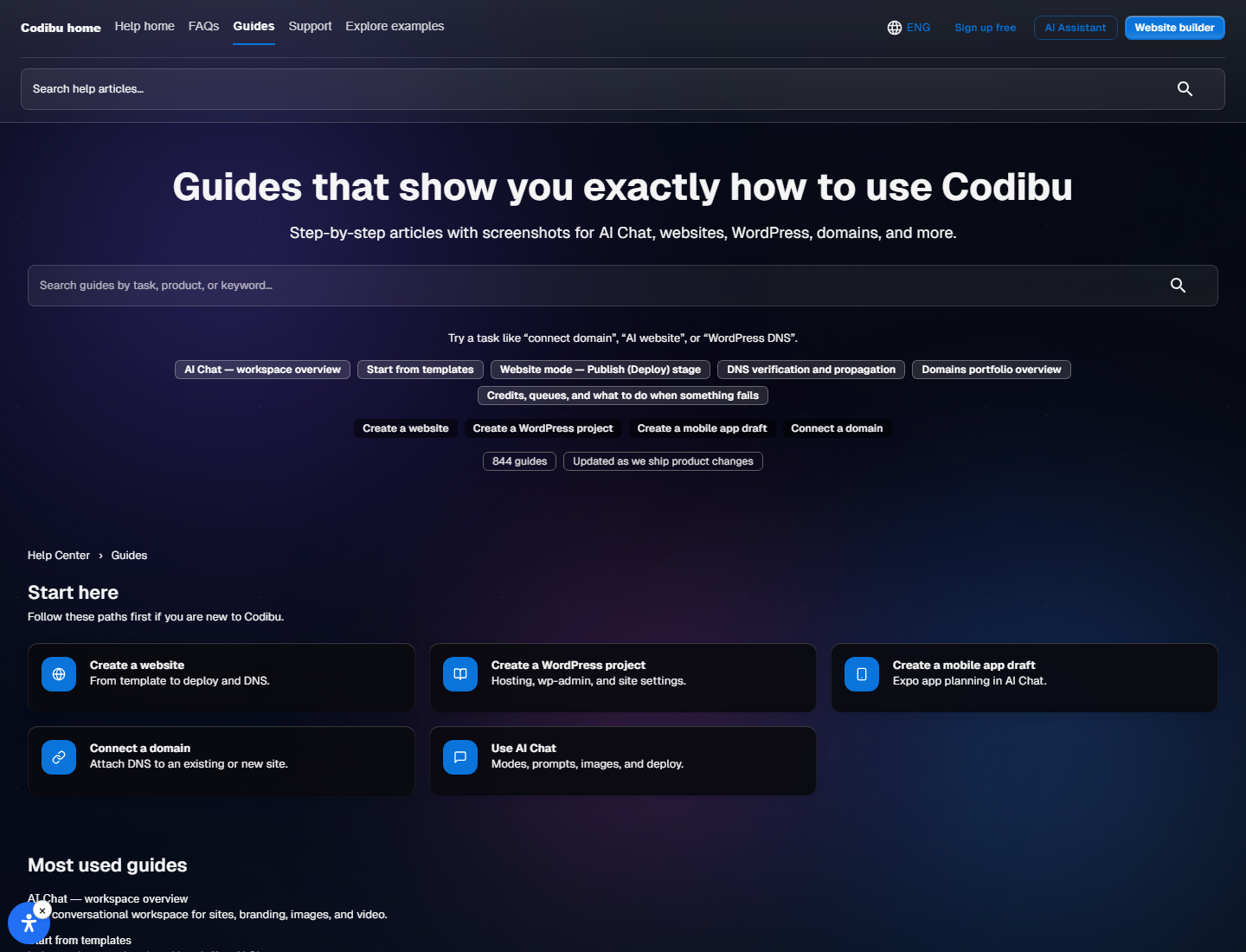
Setup guide article with steps and related links in Help Center.

Pick the topic closest to your next step. Each section keeps answers short and specific.
Yes. Draft in AI Chat, preview sections, edit copy and layout, then connect a domain when you are ready — not instant production launch.
Yes. Pick a template, swap sections, and refine with AI or the visual editor.
Layouts are responsive by default. Check mobile preview before you publish.
Yes. Reopen the editor to update pages, images, and SEO fields.
No. Brochure sites can stay static HTML. Choose WordPress when you need posts, plugins, or CMS workflows.
Hosting, updates, and an editor for pages and posts — see your plan for limits.
Many teams start with HTML and add WordPress when content grows. Plan domain and hosting early.
Allowed plugins depend on your plan. Confirm before you rely on a specific extension.
Screen structure and navigation drafts in app mode — review before preview or export; not a guaranteed store-ready app.
When Expo preview is supported, use Expo Go during iteration — availability depends on your draft and plan.
Codibu helps with drafts and export. App Store or Play Store builds are your pipeline when you are ready.
Product shots, hero visuals, ad creatives, edits, and short motion from stills — review before reuse.
Yes. Drop assets into site sections or download files for ads and social.
Start from a still, describe motion, preview the clip, then export when it fits your page.
Three visual directions with colors and type hints — pick one before final creative.
Branding mode produces direction assets per plan — confirm deliverables before commercial use.
Yes. Chosen palette and tone can inform layouts and hero copy in the same workspace.
Yes. Connect a domain you own or search and register inside Codibu.
HTTPS activates when DNS is configured correctly. Track status in My Domains — timing varies.
Use a temporary project URL while DNS propagates, then switch to your domain when ready.
Plans set limits on AI usage, sites, and publishing features. See the Pricing page for current inclusions.
You can explore within free-tier limits where available. Upgrade when you need higher caps — see Pricing for terms.
Credit rules vary by plan. Check your account and Pricing for current terms.
Manage billing in account settings. Changes follow your subscription terms.
Browsing and many marketing pages work as a guest. Saving projects, domains, and billing requires sign-in.
Use the sign-in page password reset flow. Account email must be reachable.
Billing, domains, and site-specific fixes often need your account context — guest support is limited.
Search Help Center FAQs and guides first, then contact support for account-specific issues.
Support channels and hours depend on your plan. Self-serve FAQs and guides are always available.
Yes. Update SEO fields in the editor, then republish.
Facts, legal copy, contact details, and external links — you approve what customers see.
Product UI
Support contact flow with form and product status — account review may require sign-in.

Search FAQs & guides
Start on /help-center/faqs or browse guides by product area.
Review product status
Check known issues on the support page before you submit.
Contact support
Use the support form or email when your issue needs account review.
Sign in if needed
Billing, domains, and site-specific fixes often require your account.
When you're ready, take the next step.
Turn this into a live project in your account.
Screens from the Codibu workspace — draft, review, and export states you will use in your project.

Help Center search
Search · categories · popular
The Codibu Help Center FAQ screen — search field, topic categories, and popular questions. Not a CMS dashboard mock.

Support contact flow
Guides · form · next step
Support page with contact options and product status — account-specific issues may require sign-in.
Find answers by topic, review setup guides, and contact support when you need help. FAQ pages help customers understand AI creation, websites, domains, pricing, and support paths.
For account-specific issues, sign in or use Help Center support — response times are not guaranteed.
Filters the FAQ list below — for the full Help Center search, open Browse FAQs.
Product UI
Help Center FAQ search with categories and popular questions — not a CMS dashboard mock.

Topic-grouped answers and routes to Help Center—not an FAQ builder product.
Categorized answers
AI, website, domains, pricing, account, and support topics.
Popular questions
Common starting points before you open a product area.
Page filter
Keyword filter for questions on this page; full search lives in Help Center.
Support path
Guides, FAQs, and contact support when self-serve is not enough.
Product UI
Help Center FAQ search with categories and popular questions — not a CMS dashboard mock.

Product UI
Support contact flow with form and product status — account review may require sign-in.

The questions people ask most, with straight answers:
No. Describe what you need and get drafts and layouts you can edit yourself.
Yes. Draft in AI Chat, preview, edit, then connect your domain and hosting.
Yes. Connect a domain you already own or buy a new one inside Codibu.
Yes. Keep editing SEO, pages, and content after you go live.
No. Simple sites can stay as fast HTML. Choose WordPress when you need a blog or full CMS.
Copy, landing blocks, product shots, edits, short motion clips, and campaign assets — review outputs before publishing.
Use static HTML for fast brochure sites. Choose WordPress when you need posts, plugins, or a familiar CMS — plan hosting accordingly.
Drafts can appear in minutes. Custom domains depend on DNS and SSL propagation — timing varies.
Choose a topic
Pick AI, website, domains, pricing, account, or support.
Read setup steps
Short answers here; deeper guides live in Help Center.
Open related product
Jump to Website, Domains, AI Chat, or Pricing when you are ready.
Contact support
Account-specific issues may need sign-in or the support form.
Product UI
Setup guide article with steps and related links in Help Center.

Pick the topic closest to your next step. Each section keeps answers short and specific.
Yes. Draft in AI Chat, preview sections, edit copy and layout, then connect a domain when you are ready — not instant production launch.
Yes. Pick a template, swap sections, and refine with AI or the visual editor.
Layouts are responsive by default. Check mobile preview before you publish.
Yes. Reopen the editor to update pages, images, and SEO fields.
No. Brochure sites can stay static HTML. Choose WordPress when you need posts, plugins, or CMS workflows.
Hosting, updates, and an editor for pages and posts — see your plan for limits.
Many teams start with HTML and add WordPress when content grows. Plan domain and hosting early.
Allowed plugins depend on your plan. Confirm before you rely on a specific extension.
Screen structure and navigation drafts in app mode — review before preview or export; not a guaranteed store-ready app.
When Expo preview is supported, use Expo Go during iteration — availability depends on your draft and plan.
Codibu helps with drafts and export. App Store or Play Store builds are your pipeline when you are ready.
Product shots, hero visuals, ad creatives, edits, and short motion from stills — review before reuse.
Yes. Drop assets into site sections or download files for ads and social.
Start from a still, describe motion, preview the clip, then export when it fits your page.
Three visual directions with colors and type hints — pick one before final creative.
Branding mode produces direction assets per plan — confirm deliverables before commercial use.
Yes. Chosen palette and tone can inform layouts and hero copy in the same workspace.
Yes. Connect a domain you own or search and register inside Codibu.
HTTPS activates when DNS is configured correctly. Track status in My Domains — timing varies.
Use a temporary project URL while DNS propagates, then switch to your domain when ready.
Plans set limits on AI usage, sites, and publishing features. See the Pricing page for current inclusions.
You can explore within free-tier limits where available. Upgrade when you need higher caps — see Pricing for terms.
Credit rules vary by plan. Check your account and Pricing for current terms.
Manage billing in account settings. Changes follow your subscription terms.
Browsing and many marketing pages work as a guest. Saving projects, domains, and billing requires sign-in.
Use the sign-in page password reset flow. Account email must be reachable.
Billing, domains, and site-specific fixes often need your account context — guest support is limited.
Search Help Center FAQs and guides first, then contact support for account-specific issues.
Support channels and hours depend on your plan. Self-serve FAQs and guides are always available.
Yes. Update SEO fields in the editor, then republish.
Facts, legal copy, contact details, and external links — you approve what customers see.
Product UI
Support contact flow with form and product status — account review may require sign-in.

Search FAQs & guides
Start on /help-center/faqs or browse guides by product area.
Review product status
Check known issues on the support page before you submit.
Contact support
Use the support form or email when your issue needs account review.
Sign in if needed
Billing, domains, and site-specific fixes often require your account.
When you're ready, take the next step.
Turn this into a live project in your account.
Screens from the Codibu workspace — draft, review, and export states you will use in your project.

Help Center search
Search · categories · popular
The Codibu Help Center FAQ screen — search field, topic categories, and popular questions. Not a CMS dashboard mock.

Support contact flow
Guides · form · next step
Support page with contact options and product status — account-specific issues may require sign-in.
Find answers by topic, review setup guides, and contact support when you need help. FAQ pages help customers understand AI creation, websites, domains, pricing, and support paths.
For account-specific issues, sign in or use Help Center support — response times are not guaranteed.
Filters the FAQ list below — for the full Help Center search, open Browse FAQs.
Product UI
Help Center FAQ search with categories and popular questions — not a CMS dashboard mock.

Topic-grouped answers and routes to Help Center—not an FAQ builder product.
Categorized answers
AI, website, domains, pricing, account, and support topics.
Popular questions
Common starting points before you open a product area.
Page filter
Keyword filter for questions on this page; full search lives in Help Center.
Support path
Guides, FAQs, and contact support when self-serve is not enough.
Product UI
Help Center FAQ search with categories and popular questions — not a CMS dashboard mock.

Product UI
Support contact flow with form and product status — account review may require sign-in.

The questions people ask most, with straight answers:
No. Describe what you need and get drafts and layouts you can edit yourself.
Yes. Draft in AI Chat, preview, edit, then connect your domain and hosting.
Yes. Connect a domain you already own or buy a new one inside Codibu.
Yes. Keep editing SEO, pages, and content after you go live.
No. Simple sites can stay as fast HTML. Choose WordPress when you need a blog or full CMS.
Copy, landing blocks, product shots, edits, short motion clips, and campaign assets — review outputs before publishing.
Use static HTML for fast brochure sites. Choose WordPress when you need posts, plugins, or a familiar CMS — plan hosting accordingly.
Drafts can appear in minutes. Custom domains depend on DNS and SSL propagation — timing varies.
Choose a topic
Pick AI, website, domains, pricing, account, or support.
Read setup steps
Short answers here; deeper guides live in Help Center.
Open related product
Jump to Website, Domains, AI Chat, or Pricing when you are ready.
Contact support
Account-specific issues may need sign-in or the support form.
Product UI
Setup guide article with steps and related links in Help Center.

Pick the topic closest to your next step. Each section keeps answers short and specific.
Yes. Draft in AI Chat, preview sections, edit copy and layout, then connect a domain when you are ready — not instant production launch.
Yes. Pick a template, swap sections, and refine with AI or the visual editor.
Layouts are responsive by default. Check mobile preview before you publish.
Yes. Reopen the editor to update pages, images, and SEO fields.
No. Brochure sites can stay static HTML. Choose WordPress when you need posts, plugins, or CMS workflows.
Hosting, updates, and an editor for pages and posts — see your plan for limits.
Many teams start with HTML and add WordPress when content grows. Plan domain and hosting early.
Allowed plugins depend on your plan. Confirm before you rely on a specific extension.
Screen structure and navigation drafts in app mode — review before preview or export; not a guaranteed store-ready app.
When Expo preview is supported, use Expo Go during iteration — availability depends on your draft and plan.
Codibu helps with drafts and export. App Store or Play Store builds are your pipeline when you are ready.
Product shots, hero visuals, ad creatives, edits, and short motion from stills — review before reuse.
Yes. Drop assets into site sections or download files for ads and social.
Start from a still, describe motion, preview the clip, then export when it fits your page.
Three visual directions with colors and type hints — pick one before final creative.
Branding mode produces direction assets per plan — confirm deliverables before commercial use.
Yes. Chosen palette and tone can inform layouts and hero copy in the same workspace.
Yes. Connect a domain you own or search and register inside Codibu.
HTTPS activates when DNS is configured correctly. Track status in My Domains — timing varies.
Use a temporary project URL while DNS propagates, then switch to your domain when ready.
Plans set limits on AI usage, sites, and publishing features. See the Pricing page for current inclusions.
You can explore within free-tier limits where available. Upgrade when you need higher caps — see Pricing for terms.
Credit rules vary by plan. Check your account and Pricing for current terms.
Manage billing in account settings. Changes follow your subscription terms.
Browsing and many marketing pages work as a guest. Saving projects, domains, and billing requires sign-in.
Use the sign-in page password reset flow. Account email must be reachable.
Billing, domains, and site-specific fixes often need your account context — guest support is limited.
Search Help Center FAQs and guides first, then contact support for account-specific issues.
Support channels and hours depend on your plan. Self-serve FAQs and guides are always available.
Yes. Update SEO fields in the editor, then republish.
Facts, legal copy, contact details, and external links — you approve what customers see.
Product UI
Support contact flow with form and product status — account review may require sign-in.

Search FAQs & guides
Start on /help-center/faqs or browse guides by product area.
Review product status
Check known issues on the support page before you submit.
Contact support
Use the support form or email when your issue needs account review.
Sign in if needed
Billing, domains, and site-specific fixes often require your account.
When you're ready, take the next step.
Turn this into a live project in your account.
Screens from the Codibu workspace — draft, review, and export states you will use in your project.

Help Center search
Search · categories · popular
The Codibu Help Center FAQ screen — search field, topic categories, and popular questions. Not a CMS dashboard mock.

Support contact flow
Guides · form · next step
Support page with contact options and product status — account-specific issues may require sign-in.
Find answers by topic, review setup guides, and contact support when you need help. FAQ pages help customers understand AI creation, websites, domains, pricing, and support paths.
For account-specific issues, sign in or use Help Center support — response times are not guaranteed.
Filters the FAQ list below — for the full Help Center search, open Browse FAQs.
Product UI
Help Center FAQ search with categories and popular questions — not a CMS dashboard mock.

Topic-grouped answers and routes to Help Center—not an FAQ builder product.
Categorized answers
AI, website, domains, pricing, account, and support topics.
Popular questions
Common starting points before you open a product area.
Page filter
Keyword filter for questions on this page; full search lives in Help Center.
Support path
Guides, FAQs, and contact support when self-serve is not enough.
Product UI
Help Center FAQ search with categories and popular questions — not a CMS dashboard mock.

Product UI
Support contact flow with form and product status — account review may require sign-in.

The questions people ask most, with straight answers:
No. Describe what you need and get drafts and layouts you can edit yourself.
Yes. Draft in AI Chat, preview, edit, then connect your domain and hosting.
Yes. Connect a domain you already own or buy a new one inside Codibu.
Yes. Keep editing SEO, pages, and content after you go live.
No. Simple sites can stay as fast HTML. Choose WordPress when you need a blog or full CMS.
Copy, landing blocks, product shots, edits, short motion clips, and campaign assets — review outputs before publishing.
Use static HTML for fast brochure sites. Choose WordPress when you need posts, plugins, or a familiar CMS — plan hosting accordingly.
Drafts can appear in minutes. Custom domains depend on DNS and SSL propagation — timing varies.
Choose a topic
Pick AI, website, domains, pricing, account, or support.
Read setup steps
Short answers here; deeper guides live in Help Center.
Open related product
Jump to Website, Domains, AI Chat, or Pricing when you are ready.
Contact support
Account-specific issues may need sign-in or the support form.
Product UI
Setup guide article with steps and related links in Help Center.

Pick the topic closest to your next step. Each section keeps answers short and specific.
Yes. Draft in AI Chat, preview sections, edit copy and layout, then connect a domain when you are ready — not instant production launch.
Yes. Pick a template, swap sections, and refine with AI or the visual editor.
Layouts are responsive by default. Check mobile preview before you publish.
Yes. Reopen the editor to update pages, images, and SEO fields.
No. Brochure sites can stay static HTML. Choose WordPress when you need posts, plugins, or CMS workflows.
Hosting, updates, and an editor for pages and posts — see your plan for limits.
Many teams start with HTML and add WordPress when content grows. Plan domain and hosting early.
Allowed plugins depend on your plan. Confirm before you rely on a specific extension.
Screen structure and navigation drafts in app mode — review before preview or export; not a guaranteed store-ready app.
When Expo preview is supported, use Expo Go during iteration — availability depends on your draft and plan.
Codibu helps with drafts and export. App Store or Play Store builds are your pipeline when you are ready.
Product shots, hero visuals, ad creatives, edits, and short motion from stills — review before reuse.
Yes. Drop assets into site sections or download files for ads and social.
Start from a still, describe motion, preview the clip, then export when it fits your page.
Three visual directions with colors and type hints — pick one before final creative.
Branding mode produces direction assets per plan — confirm deliverables before commercial use.
Yes. Chosen palette and tone can inform layouts and hero copy in the same workspace.
Yes. Connect a domain you own or search and register inside Codibu.
HTTPS activates when DNS is configured correctly. Track status in My Domains — timing varies.
Use a temporary project URL while DNS propagates, then switch to your domain when ready.
Plans set limits on AI usage, sites, and publishing features. See the Pricing page for current inclusions.
You can explore within free-tier limits where available. Upgrade when you need higher caps — see Pricing for terms.
Credit rules vary by plan. Check your account and Pricing for current terms.
Manage billing in account settings. Changes follow your subscription terms.
Browsing and many marketing pages work as a guest. Saving projects, domains, and billing requires sign-in.
Use the sign-in page password reset flow. Account email must be reachable.
Billing, domains, and site-specific fixes often need your account context — guest support is limited.
Search Help Center FAQs and guides first, then contact support for account-specific issues.
Support channels and hours depend on your plan. Self-serve FAQs and guides are always available.
Yes. Update SEO fields in the editor, then republish.
Facts, legal copy, contact details, and external links — you approve what customers see.
Product UI
Support contact flow with form and product status — account review may require sign-in.

Search FAQs & guides
Start on /help-center/faqs or browse guides by product area.
Review product status
Check known issues on the support page before you submit.
Contact support
Use the support form or email when your issue needs account review.
Sign in if needed
Billing, domains, and site-specific fixes often require your account.
When you're ready, take the next step.
Turn this into a live project in your account.
Screens from the Codibu workspace — draft, review, and export states you will use in your project.

Help Center search
Search · categories · popular
The Codibu Help Center FAQ screen — search field, topic categories, and popular questions. Not a CMS dashboard mock.

Support contact flow
Guides · form · next step
Support page with contact options and product status — account-specific issues may require sign-in.
Find answers by topic, review setup guides, and contact support when you need help. FAQ pages help customers understand AI creation, websites, domains, pricing, and support paths.
For account-specific issues, sign in or use Help Center support — response times are not guaranteed.
Filters the FAQ list below — for the full Help Center search, open Browse FAQs.
Product UI
Help Center FAQ search with categories and popular questions — not a CMS dashboard mock.

Topic-grouped answers and routes to Help Center—not an FAQ builder product.
Categorized answers
AI, website, domains, pricing, account, and support topics.
Popular questions
Common starting points before you open a product area.
Page filter
Keyword filter for questions on this page; full search lives in Help Center.
Support path
Guides, FAQs, and contact support when self-serve is not enough.
Product UI
Help Center FAQ search with categories and popular questions — not a CMS dashboard mock.

Product UI
Support contact flow with form and product status — account review may require sign-in.

The questions people ask most, with straight answers:
No. Describe what you need and get drafts and layouts you can edit yourself.
Yes. Draft in AI Chat, preview, edit, then connect your domain and hosting.
Yes. Connect a domain you already own or buy a new one inside Codibu.
Yes. Keep editing SEO, pages, and content after you go live.
No. Simple sites can stay as fast HTML. Choose WordPress when you need a blog or full CMS.
Copy, landing blocks, product shots, edits, short motion clips, and campaign assets — review outputs before publishing.
Use static HTML for fast brochure sites. Choose WordPress when you need posts, plugins, or a familiar CMS — plan hosting accordingly.
Drafts can appear in minutes. Custom domains depend on DNS and SSL propagation — timing varies.
Choose a topic
Pick AI, website, domains, pricing, account, or support.
Read setup steps
Short answers here; deeper guides live in Help Center.
Open related product
Jump to Website, Domains, AI Chat, or Pricing when you are ready.
Contact support
Account-specific issues may need sign-in or the support form.
Product UI
Setup guide article with steps and related links in Help Center.

Pick the topic closest to your next step. Each section keeps answers short and specific.
Yes. Draft in AI Chat, preview sections, edit copy and layout, then connect a domain when you are ready — not instant production launch.
Yes. Pick a template, swap sections, and refine with AI or the visual editor.
Layouts are responsive by default. Check mobile preview before you publish.
Yes. Reopen the editor to update pages, images, and SEO fields.
No. Brochure sites can stay static HTML. Choose WordPress when you need posts, plugins, or CMS workflows.
Hosting, updates, and an editor for pages and posts — see your plan for limits.
Many teams start with HTML and add WordPress when content grows. Plan domain and hosting early.
Allowed plugins depend on your plan. Confirm before you rely on a specific extension.
Screen structure and navigation drafts in app mode — review before preview or export; not a guaranteed store-ready app.
When Expo preview is supported, use Expo Go during iteration — availability depends on your draft and plan.
Codibu helps with drafts and export. App Store or Play Store builds are your pipeline when you are ready.
Product shots, hero visuals, ad creatives, edits, and short motion from stills — review before reuse.
Yes. Drop assets into site sections or download files for ads and social.
Start from a still, describe motion, preview the clip, then export when it fits your page.
Three visual directions with colors and type hints — pick one before final creative.
Branding mode produces direction assets per plan — confirm deliverables before commercial use.
Yes. Chosen palette and tone can inform layouts and hero copy in the same workspace.
Yes. Connect a domain you own or search and register inside Codibu.
HTTPS activates when DNS is configured correctly. Track status in My Domains — timing varies.
Use a temporary project URL while DNS propagates, then switch to your domain when ready.
Plans set limits on AI usage, sites, and publishing features. See the Pricing page for current inclusions.
You can explore within free-tier limits where available. Upgrade when you need higher caps — see Pricing for terms.
Credit rules vary by plan. Check your account and Pricing for current terms.
Manage billing in account settings. Changes follow your subscription terms.
Browsing and many marketing pages work as a guest. Saving projects, domains, and billing requires sign-in.
Use the sign-in page password reset flow. Account email must be reachable.
Billing, domains, and site-specific fixes often need your account context — guest support is limited.
Search Help Center FAQs and guides first, then contact support for account-specific issues.
Support channels and hours depend on your plan. Self-serve FAQs and guides are always available.
Yes. Update SEO fields in the editor, then republish.
Facts, legal copy, contact details, and external links — you approve what customers see.
Product UI
Support contact flow with form and product status — account review may require sign-in.

Search FAQs & guides
Start on /help-center/faqs or browse guides by product area.
Review product status
Check known issues on the support page before you submit.
Contact support
Use the support form or email when your issue needs account review.
Sign in if needed
Billing, domains, and site-specific fixes often require your account.
When you're ready, take the next step.
Turn this into a live project in your account.
Screens from the Codibu workspace — draft, review, and export states you will use in your project.

Help Center search
Search · categories · popular
The Codibu Help Center FAQ screen — search field, topic categories, and popular questions. Not a CMS dashboard mock.

Support contact flow
Guides · form · next step
Support page with contact options and product status — account-specific issues may require sign-in.
Find answers by topic, review setup guides, and contact support when you need help. FAQ pages help customers understand AI creation, websites, domains, pricing, and support paths.
For account-specific issues, sign in or use Help Center support — response times are not guaranteed.
Filters the FAQ list below — for the full Help Center search, open Browse FAQs.
Product UI
Help Center FAQ search with categories and popular questions — not a CMS dashboard mock.

Topic-grouped answers and routes to Help Center—not an FAQ builder product.
Categorized answers
AI, website, domains, pricing, account, and support topics.
Popular questions
Common starting points before you open a product area.
Page filter
Keyword filter for questions on this page; full search lives in Help Center.
Support path
Guides, FAQs, and contact support when self-serve is not enough.
Product UI
Help Center FAQ search with categories and popular questions — not a CMS dashboard mock.

Product UI
Support contact flow with form and product status — account review may require sign-in.

The questions people ask most, with straight answers:
No. Describe what you need and get drafts and layouts you can edit yourself.
Yes. Draft in AI Chat, preview, edit, then connect your domain and hosting.
Yes. Connect a domain you already own or buy a new one inside Codibu.
Yes. Keep editing SEO, pages, and content after you go live.
No. Simple sites can stay as fast HTML. Choose WordPress when you need a blog or full CMS.
Copy, landing blocks, product shots, edits, short motion clips, and campaign assets — review outputs before publishing.
Use static HTML for fast brochure sites. Choose WordPress when you need posts, plugins, or a familiar CMS — plan hosting accordingly.
Drafts can appear in minutes. Custom domains depend on DNS and SSL propagation — timing varies.
Choose a topic
Pick AI, website, domains, pricing, account, or support.
Read setup steps
Short answers here; deeper guides live in Help Center.
Open related product
Jump to Website, Domains, AI Chat, or Pricing when you are ready.
Contact support
Account-specific issues may need sign-in or the support form.
Product UI
Setup guide article with steps and related links in Help Center.

Pick the topic closest to your next step. Each section keeps answers short and specific.
Yes. Draft in AI Chat, preview sections, edit copy and layout, then connect a domain when you are ready — not instant production launch.
Yes. Pick a template, swap sections, and refine with AI or the visual editor.
Layouts are responsive by default. Check mobile preview before you publish.
Yes. Reopen the editor to update pages, images, and SEO fields.
No. Brochure sites can stay static HTML. Choose WordPress when you need posts, plugins, or CMS workflows.
Hosting, updates, and an editor for pages and posts — see your plan for limits.
Many teams start with HTML and add WordPress when content grows. Plan domain and hosting early.
Allowed plugins depend on your plan. Confirm before you rely on a specific extension.
Screen structure and navigation drafts in app mode — review before preview or export; not a guaranteed store-ready app.
When Expo preview is supported, use Expo Go during iteration — availability depends on your draft and plan.
Codibu helps with drafts and export. App Store or Play Store builds are your pipeline when you are ready.
Product shots, hero visuals, ad creatives, edits, and short motion from stills — review before reuse.
Yes. Drop assets into site sections or download files for ads and social.
Start from a still, describe motion, preview the clip, then export when it fits your page.
Three visual directions with colors and type hints — pick one before final creative.
Branding mode produces direction assets per plan — confirm deliverables before commercial use.
Yes. Chosen palette and tone can inform layouts and hero copy in the same workspace.
Yes. Connect a domain you own or search and register inside Codibu.
HTTPS activates when DNS is configured correctly. Track status in My Domains — timing varies.
Use a temporary project URL while DNS propagates, then switch to your domain when ready.
Plans set limits on AI usage, sites, and publishing features. See the Pricing page for current inclusions.
You can explore within free-tier limits where available. Upgrade when you need higher caps — see Pricing for terms.
Credit rules vary by plan. Check your account and Pricing for current terms.
Manage billing in account settings. Changes follow your subscription terms.
Browsing and many marketing pages work as a guest. Saving projects, domains, and billing requires sign-in.
Use the sign-in page password reset flow. Account email must be reachable.
Billing, domains, and site-specific fixes often need your account context — guest support is limited.
Search Help Center FAQs and guides first, then contact support for account-specific issues.
Support channels and hours depend on your plan. Self-serve FAQs and guides are always available.
Yes. Update SEO fields in the editor, then republish.
Facts, legal copy, contact details, and external links — you approve what customers see.
Product UI
Support contact flow with form and product status — account review may require sign-in.

Search FAQs & guides
Start on /help-center/faqs or browse guides by product area.
Review product status
Check known issues on the support page before you submit.
Contact support
Use the support form or email when your issue needs account review.
Sign in if needed
Billing, domains, and site-specific fixes often require your account.
When you're ready, take the next step.
Turn this into a live project in your account.
Screens from the Codibu workspace — draft, review, and export states you will use in your project.

Help Center search
Search · categories · popular
The Codibu Help Center FAQ screen — search field, topic categories, and popular questions. Not a CMS dashboard mock.

Support contact flow
Guides · form · next step
Support page with contact options and product status — account-specific issues may require sign-in.