Upload or choose a source image, describe the motion you want, and generate a short clip in Codibu image-to-video mode. Results should be reviewed before publishing; quality and render time vary by input, prompt, model, and plan credits.
Image-to-video needs a source image in AI Chat — add one after you open the workspace if you start from this prompt.
Short motion drafts for review—not guaranteed broadcast-ready masters.
Video concepts
Clips from a text brief or a still photo with motion intent.
Motion prompts
Guidance on camera move, subject, and loop length.
Short loops
Product turns, hero motion, and social-friendly seconds.
Social-ready variants
Formats suited for feeds and landing hero backgrounds.
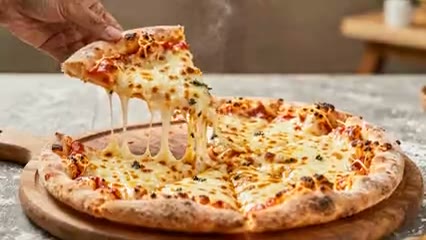
Generated video examples
Short motion concept for hero or social — review before use, not a guaranteed ad master.
Image-to-video moves through three checkpoints — source image, motion direction, and a draft preview you can review before reuse.
Step 1
Source image
Upload a product shot, hero still, or portrait — or pick one from your gallery.
Step 2
Motion prompt
Describe camera move, subject motion, or atmosphere in plain language.
Step 3
Preview
Review the generated clip, adjust the prompt, and save when it fits your campaign.
Common starting points:
Product showcase loops
Subtle rotation or push-in on product shots — motion concepts, not guaranteed broadcast masters.
Restaurant and cafe promos
Food, room, and specials that look good in feed and on the menu page.
Fashion and beauty clips
Light and movement that read premium in a few seconds.
Website hero background video
Soft loop behind the headline—harder to ignore than a still.
Social ads and reels
Short clips sized for stories and paid social.
Before/after motion previews
Show change with motion instead of a long explainer video.
Restaurant or menu focus
Dishes and atmosphere in motion—helps bookings and orders.
Beauty product reveal
Show texture and glow without a tutorial-length shoot.
Real estate or venue
Walk through light and space—hard to sell in one photo.
Event or announcement
Short urgency for openings, launches, and limited runs.
Upload or describe
Your photo, or the scene in plain words.
Pick the motion feel
Slow, bold, warm—say it like you would to an editor.
Preview and adjust
Watch the draft, tweak, keep the version that fits the campaign.
Publish on site, ad, or social
Save when ready, then reuse on a page, ad, or post — after you approve the draft.
Short motion clips respond to camera words, lighting, and one clear subject — not a full storyboard.
Name the camera move
"Slow push-in" or "gentle orbit" beats vague "make it cinematic" — the model picks a single motion path.
Keep one hero subject
One product, one dish, one face. Extra people or props fight for pixels in a six-second loop.
Say the mood in plain words
Warm café light, cold studio, neon night — everyday adjectives steer color and contrast.
Match aspect to placement
Call out hero (wide), story (vertical), or square feed before render so you do not recrop later.
Image-to-video is beta and best for short motion concepts — not full production, long edits, or guaranteed platform-ready ads.
Clips are short (roughly 4–8 seconds) — motion concepts for loops and heroes, not full tutorials or explainers.
Final output must be reviewed before use — quality varies with source image, prompt, model load, and plan credits.
Text, logos, legal claims, and fine anatomy or hand motion can drift — add typography and compliance review after export.
Text-heavy scenes, multi-subject action, and precise brand/legal claims are a poor fit — one motion beat per clip is usually cleanest.
Generation may take time and can consume credits depending on your plan and model availability.
Confirm commercial use, likeness, and platform policies before publishing — beta feature, not legal clearance.
Generated video examples
Generated video examples — inspiration only, not product UI screenshots. Review before publishing.

Generated example
Landscape
Pizza commercial

Generated example
Vertical
Pancake syrup scene

Generated example
Landscape
Street food hero

Generated example
Vertical
Luxury bag showcase

Generated example
Landscape
Matcha beverage

Generated example
Vertical
Iced coffee splash
Upload a still — product, hero, or portrait — and describe the motion. You get a short draft to preview; review before using on a hero, ad, or email.
Product UI screenshot

Wind through hair or fabric
Soft movement on hair, scarves, or loose clothing — adds life without distorting the subject.
Slow product turns
A subtle rotation or push-in on a product photo — useful for hero sections and ads.
Water and steam
Coffee swirls, steam rising, water shimmer — small details that read instantly as motion.
Subtle parallax
Foreground holds, background drifts — a cinematic look without re-shooting on a rig.
Facial micro-motion
Eye blinks, a slight smile shift — a portrait that feels alive in a hero video card.
Camera moves
Slow push-ins, slight pans, or zooms — the still becomes a shot, not a slideshow.
Image-to-video shines at subtle, photographic motion. Anything that needs a full scene change or cuts belongs elsewhere.
GOOD FOR
A 5-second loop of a steaming ramen bowl for the homepage hero.
vs
AVOID
A 30-second tutorial showing how to make ramen step by step.
GOOD FOR
Subtle wind through the model's hair on a fashion landing page.
vs
AVOID
The model walking down a runway with full body and camera motion.
GOOD FOR
Slow push-in on a product hero for a paid social ad.
vs
AVOID
A multi-shot product demo with cuts, voiceover, and text overlays.
GOOD FOR
Steam, water shimmer, or candlelight flicker on a still scene.
vs
AVOID
A wide environment animation where multiple subjects move differently.
Generated video result

When you're ready, take the next step.
Turn this into a live project in your account.
Start from AI Images, then animate—or schedule clips in Social Poster.
Screens from the Codibu workspace — draft, review, and export states you will use in your project.

Image-to-video workspace
Source image · motion prompt
Codibu image-to-video mode — upload area, motion prompt, and generate controls. Not a finished clip poster.

Generated video result
Preview · metadata
Result preview with player and prompt context — review the draft before reuse on pages or ads.
Upload or choose a source image, describe the motion you want, and generate a short clip in Codibu image-to-video mode. Results should be reviewed before publishing; quality and render time vary by input, prompt, model, and plan credits.
Image-to-video needs a source image in AI Chat — add one after you open the workspace if you start from this prompt.
Short motion drafts for review—not guaranteed broadcast-ready masters.
Video concepts
Clips from a text brief or a still photo with motion intent.
Motion prompts
Guidance on camera move, subject, and loop length.
Short loops
Product turns, hero motion, and social-friendly seconds.
Social-ready variants
Formats suited for feeds and landing hero backgrounds.

Generated video examples
Short motion concept for hero or social — review before use, not a guaranteed ad master.
Image-to-video moves through three checkpoints — source image, motion direction, and a draft preview you can review before reuse.
Step 1
Source image
Upload a product shot, hero still, or portrait — or pick one from your gallery.
Step 2
Motion prompt
Describe camera move, subject motion, or atmosphere in plain language.
Step 3
Preview
Review the generated clip, adjust the prompt, and save when it fits your campaign.
Common starting points:
Product showcase loops
Subtle rotation or push-in on product shots — motion concepts, not guaranteed broadcast masters.
Restaurant and cafe promos
Food, room, and specials that look good in feed and on the menu page.
Fashion and beauty clips
Light and movement that read premium in a few seconds.
Website hero background video
Soft loop behind the headline—harder to ignore than a still.
Social ads and reels
Short clips sized for stories and paid social.
Before/after motion previews
Show change with motion instead of a long explainer video.
Restaurant or menu focus
Dishes and atmosphere in motion—helps bookings and orders.
Beauty product reveal
Show texture and glow without a tutorial-length shoot.
Real estate or venue
Walk through light and space—hard to sell in one photo.
Event or announcement
Short urgency for openings, launches, and limited runs.
Upload or describe
Your photo, or the scene in plain words.
Pick the motion feel
Slow, bold, warm—say it like you would to an editor.
Preview and adjust
Watch the draft, tweak, keep the version that fits the campaign.
Publish on site, ad, or social
Save when ready, then reuse on a page, ad, or post — after you approve the draft.
Short motion clips respond to camera words, lighting, and one clear subject — not a full storyboard.
Name the camera move
"Slow push-in" or "gentle orbit" beats vague "make it cinematic" — the model picks a single motion path.
Keep one hero subject
One product, one dish, one face. Extra people or props fight for pixels in a six-second loop.
Say the mood in plain words
Warm café light, cold studio, neon night — everyday adjectives steer color and contrast.
Match aspect to placement
Call out hero (wide), story (vertical), or square feed before render so you do not recrop later.
Image-to-video is beta and best for short motion concepts — not full production, long edits, or guaranteed platform-ready ads.
Clips are short (roughly 4–8 seconds) — motion concepts for loops and heroes, not full tutorials or explainers.
Final output must be reviewed before use — quality varies with source image, prompt, model load, and plan credits.
Text, logos, legal claims, and fine anatomy or hand motion can drift — add typography and compliance review after export.
Text-heavy scenes, multi-subject action, and precise brand/legal claims are a poor fit — one motion beat per clip is usually cleanest.
Generation may take time and can consume credits depending on your plan and model availability.
Confirm commercial use, likeness, and platform policies before publishing — beta feature, not legal clearance.
Generated video examples
Generated video examples — inspiration only, not product UI screenshots. Review before publishing.

Generated example
Landscape
Pizza commercial

Generated example
Vertical
Pancake syrup scene

Generated example
Landscape
Street food hero

Generated example
Vertical
Luxury bag showcase

Generated example
Landscape
Matcha beverage

Generated example
Vertical
Iced coffee splash
Upload a still — product, hero, or portrait — and describe the motion. You get a short draft to preview; review before using on a hero, ad, or email.
Product UI screenshot

Wind through hair or fabric
Soft movement on hair, scarves, or loose clothing — adds life without distorting the subject.
Slow product turns
A subtle rotation or push-in on a product photo — useful for hero sections and ads.
Water and steam
Coffee swirls, steam rising, water shimmer — small details that read instantly as motion.
Subtle parallax
Foreground holds, background drifts — a cinematic look without re-shooting on a rig.
Facial micro-motion
Eye blinks, a slight smile shift — a portrait that feels alive in a hero video card.
Camera moves
Slow push-ins, slight pans, or zooms — the still becomes a shot, not a slideshow.
Image-to-video shines at subtle, photographic motion. Anything that needs a full scene change or cuts belongs elsewhere.
GOOD FOR
A 5-second loop of a steaming ramen bowl for the homepage hero.
vs
AVOID
A 30-second tutorial showing how to make ramen step by step.
GOOD FOR
Subtle wind through the model's hair on a fashion landing page.
vs
AVOID
The model walking down a runway with full body and camera motion.
GOOD FOR
Slow push-in on a product hero for a paid social ad.
vs
AVOID
A multi-shot product demo with cuts, voiceover, and text overlays.
GOOD FOR
Steam, water shimmer, or candlelight flicker on a still scene.
vs
AVOID
A wide environment animation where multiple subjects move differently.
Generated video result

When you're ready, take the next step.
Turn this into a live project in your account.
Start from AI Images, then animate—or schedule clips in Social Poster.
Screens from the Codibu workspace — draft, review, and export states you will use in your project.

Image-to-video workspace
Source image · motion prompt
Codibu image-to-video mode — upload area, motion prompt, and generate controls. Not a finished clip poster.

Generated video result
Preview · metadata
Result preview with player and prompt context — review the draft before reuse on pages or ads.
Upload or choose a source image, describe the motion you want, and generate a short clip in Codibu image-to-video mode. Results should be reviewed before publishing; quality and render time vary by input, prompt, model, and plan credits.
Image-to-video needs a source image in AI Chat — add one after you open the workspace if you start from this prompt.
Short motion drafts for review—not guaranteed broadcast-ready masters.
Video concepts
Clips from a text brief or a still photo with motion intent.
Motion prompts
Guidance on camera move, subject, and loop length.
Short loops
Product turns, hero motion, and social-friendly seconds.
Social-ready variants
Formats suited for feeds and landing hero backgrounds.

Generated video examples
Short motion concept for hero or social — review before use, not a guaranteed ad master.
Image-to-video moves through three checkpoints — source image, motion direction, and a draft preview you can review before reuse.
Step 1
Source image
Upload a product shot, hero still, or portrait — or pick one from your gallery.
Step 2
Motion prompt
Describe camera move, subject motion, or atmosphere in plain language.
Step 3
Preview
Review the generated clip, adjust the prompt, and save when it fits your campaign.
Common starting points:
Product showcase loops
Subtle rotation or push-in on product shots — motion concepts, not guaranteed broadcast masters.
Restaurant and cafe promos
Food, room, and specials that look good in feed and on the menu page.
Fashion and beauty clips
Light and movement that read premium in a few seconds.
Website hero background video
Soft loop behind the headline—harder to ignore than a still.
Social ads and reels
Short clips sized for stories and paid social.
Before/after motion previews
Show change with motion instead of a long explainer video.
Restaurant or menu focus
Dishes and atmosphere in motion—helps bookings and orders.
Beauty product reveal
Show texture and glow without a tutorial-length shoot.
Real estate or venue
Walk through light and space—hard to sell in one photo.
Event or announcement
Short urgency for openings, launches, and limited runs.
Upload or describe
Your photo, or the scene in plain words.
Pick the motion feel
Slow, bold, warm—say it like you would to an editor.
Preview and adjust
Watch the draft, tweak, keep the version that fits the campaign.
Publish on site, ad, or social
Save when ready, then reuse on a page, ad, or post — after you approve the draft.
Short motion clips respond to camera words, lighting, and one clear subject — not a full storyboard.
Name the camera move
"Slow push-in" or "gentle orbit" beats vague "make it cinematic" — the model picks a single motion path.
Keep one hero subject
One product, one dish, one face. Extra people or props fight for pixels in a six-second loop.
Say the mood in plain words
Warm café light, cold studio, neon night — everyday adjectives steer color and contrast.
Match aspect to placement
Call out hero (wide), story (vertical), or square feed before render so you do not recrop later.
Image-to-video is beta and best for short motion concepts — not full production, long edits, or guaranteed platform-ready ads.
Clips are short (roughly 4–8 seconds) — motion concepts for loops and heroes, not full tutorials or explainers.
Final output must be reviewed before use — quality varies with source image, prompt, model load, and plan credits.
Text, logos, legal claims, and fine anatomy or hand motion can drift — add typography and compliance review after export.
Text-heavy scenes, multi-subject action, and precise brand/legal claims are a poor fit — one motion beat per clip is usually cleanest.
Generation may take time and can consume credits depending on your plan and model availability.
Confirm commercial use, likeness, and platform policies before publishing — beta feature, not legal clearance.
Generated video examples
Generated video examples — inspiration only, not product UI screenshots. Review before publishing.

Generated example
Landscape
Pizza commercial

Generated example
Vertical
Pancake syrup scene

Generated example
Landscape
Street food hero

Generated example
Vertical
Luxury bag showcase

Generated example
Landscape
Matcha beverage

Generated example
Vertical
Iced coffee splash
Upload a still — product, hero, or portrait — and describe the motion. You get a short draft to preview; review before using on a hero, ad, or email.
Product UI screenshot

Wind through hair or fabric
Soft movement on hair, scarves, or loose clothing — adds life without distorting the subject.
Slow product turns
A subtle rotation or push-in on a product photo — useful for hero sections and ads.
Water and steam
Coffee swirls, steam rising, water shimmer — small details that read instantly as motion.
Subtle parallax
Foreground holds, background drifts — a cinematic look without re-shooting on a rig.
Facial micro-motion
Eye blinks, a slight smile shift — a portrait that feels alive in a hero video card.
Camera moves
Slow push-ins, slight pans, or zooms — the still becomes a shot, not a slideshow.
Image-to-video shines at subtle, photographic motion. Anything that needs a full scene change or cuts belongs elsewhere.
GOOD FOR
A 5-second loop of a steaming ramen bowl for the homepage hero.
vs
AVOID
A 30-second tutorial showing how to make ramen step by step.
GOOD FOR
Subtle wind through the model's hair on a fashion landing page.
vs
AVOID
The model walking down a runway with full body and camera motion.
GOOD FOR
Slow push-in on a product hero for a paid social ad.
vs
AVOID
A multi-shot product demo with cuts, voiceover, and text overlays.
GOOD FOR
Steam, water shimmer, or candlelight flicker on a still scene.
vs
AVOID
A wide environment animation where multiple subjects move differently.
Generated video result

When you're ready, take the next step.
Turn this into a live project in your account.
Start from AI Images, then animate—or schedule clips in Social Poster.
Screens from the Codibu workspace — draft, review, and export states you will use in your project.

Image-to-video workspace
Source image · motion prompt
Codibu image-to-video mode — upload area, motion prompt, and generate controls. Not a finished clip poster.

Generated video result
Preview · metadata
Result preview with player and prompt context — review the draft before reuse on pages or ads.
Upload or choose a source image, describe the motion you want, and generate a short clip in Codibu image-to-video mode. Results should be reviewed before publishing; quality and render time vary by input, prompt, model, and plan credits.
Image-to-video needs a source image in AI Chat — add one after you open the workspace if you start from this prompt.
Short motion drafts for review—not guaranteed broadcast-ready masters.
Video concepts
Clips from a text brief or a still photo with motion intent.
Motion prompts
Guidance on camera move, subject, and loop length.
Short loops
Product turns, hero motion, and social-friendly seconds.
Social-ready variants
Formats suited for feeds and landing hero backgrounds.

Generated video examples
Short motion concept for hero or social — review before use, not a guaranteed ad master.
Image-to-video moves through three checkpoints — source image, motion direction, and a draft preview you can review before reuse.
Step 1
Source image
Upload a product shot, hero still, or portrait — or pick one from your gallery.
Step 2
Motion prompt
Describe camera move, subject motion, or atmosphere in plain language.
Step 3
Preview
Review the generated clip, adjust the prompt, and save when it fits your campaign.
Common starting points:
Product showcase loops
Subtle rotation or push-in on product shots — motion concepts, not guaranteed broadcast masters.
Restaurant and cafe promos
Food, room, and specials that look good in feed and on the menu page.
Fashion and beauty clips
Light and movement that read premium in a few seconds.
Website hero background video
Soft loop behind the headline—harder to ignore than a still.
Social ads and reels
Short clips sized for stories and paid social.
Before/after motion previews
Show change with motion instead of a long explainer video.
Restaurant or menu focus
Dishes and atmosphere in motion—helps bookings and orders.
Beauty product reveal
Show texture and glow without a tutorial-length shoot.
Real estate or venue
Walk through light and space—hard to sell in one photo.
Event or announcement
Short urgency for openings, launches, and limited runs.
Upload or describe
Your photo, or the scene in plain words.
Pick the motion feel
Slow, bold, warm—say it like you would to an editor.
Preview and adjust
Watch the draft, tweak, keep the version that fits the campaign.
Publish on site, ad, or social
Save when ready, then reuse on a page, ad, or post — after you approve the draft.
Short motion clips respond to camera words, lighting, and one clear subject — not a full storyboard.
Name the camera move
"Slow push-in" or "gentle orbit" beats vague "make it cinematic" — the model picks a single motion path.
Keep one hero subject
One product, one dish, one face. Extra people or props fight for pixels in a six-second loop.
Say the mood in plain words
Warm café light, cold studio, neon night — everyday adjectives steer color and contrast.
Match aspect to placement
Call out hero (wide), story (vertical), or square feed before render so you do not recrop later.
Image-to-video is beta and best for short motion concepts — not full production, long edits, or guaranteed platform-ready ads.
Clips are short (roughly 4–8 seconds) — motion concepts for loops and heroes, not full tutorials or explainers.
Final output must be reviewed before use — quality varies with source image, prompt, model load, and plan credits.
Text, logos, legal claims, and fine anatomy or hand motion can drift — add typography and compliance review after export.
Text-heavy scenes, multi-subject action, and precise brand/legal claims are a poor fit — one motion beat per clip is usually cleanest.
Generation may take time and can consume credits depending on your plan and model availability.
Confirm commercial use, likeness, and platform policies before publishing — beta feature, not legal clearance.
Generated video examples
Generated video examples — inspiration only, not product UI screenshots. Review before publishing.

Generated example
Landscape
Pizza commercial

Generated example
Vertical
Pancake syrup scene

Generated example
Landscape
Street food hero

Generated example
Vertical
Luxury bag showcase

Generated example
Landscape
Matcha beverage

Generated example
Vertical
Iced coffee splash
Upload a still — product, hero, or portrait — and describe the motion. You get a short draft to preview; review before using on a hero, ad, or email.
Product UI screenshot

Wind through hair or fabric
Soft movement on hair, scarves, or loose clothing — adds life without distorting the subject.
Slow product turns
A subtle rotation or push-in on a product photo — useful for hero sections and ads.
Water and steam
Coffee swirls, steam rising, water shimmer — small details that read instantly as motion.
Subtle parallax
Foreground holds, background drifts — a cinematic look without re-shooting on a rig.
Facial micro-motion
Eye blinks, a slight smile shift — a portrait that feels alive in a hero video card.
Camera moves
Slow push-ins, slight pans, or zooms — the still becomes a shot, not a slideshow.
Image-to-video shines at subtle, photographic motion. Anything that needs a full scene change or cuts belongs elsewhere.
GOOD FOR
A 5-second loop of a steaming ramen bowl for the homepage hero.
vs
AVOID
A 30-second tutorial showing how to make ramen step by step.
GOOD FOR
Subtle wind through the model's hair on a fashion landing page.
vs
AVOID
The model walking down a runway with full body and camera motion.
GOOD FOR
Slow push-in on a product hero for a paid social ad.
vs
AVOID
A multi-shot product demo with cuts, voiceover, and text overlays.
GOOD FOR
Steam, water shimmer, or candlelight flicker on a still scene.
vs
AVOID
A wide environment animation where multiple subjects move differently.
Generated video result

When you're ready, take the next step.
Turn this into a live project in your account.
Start from AI Images, then animate—or schedule clips in Social Poster.
Screens from the Codibu workspace — draft, review, and export states you will use in your project.

Image-to-video workspace
Source image · motion prompt
Codibu image-to-video mode — upload area, motion prompt, and generate controls. Not a finished clip poster.

Generated video result
Preview · metadata
Result preview with player and prompt context — review the draft before reuse on pages or ads.
Upload or choose a source image, describe the motion you want, and generate a short clip in Codibu image-to-video mode. Results should be reviewed before publishing; quality and render time vary by input, prompt, model, and plan credits.
Image-to-video needs a source image in AI Chat — add one after you open the workspace if you start from this prompt.
Short motion drafts for review—not guaranteed broadcast-ready masters.
Video concepts
Clips from a text brief or a still photo with motion intent.
Motion prompts
Guidance on camera move, subject, and loop length.
Short loops
Product turns, hero motion, and social-friendly seconds.
Social-ready variants
Formats suited for feeds and landing hero backgrounds.

Generated video examples
Short motion concept for hero or social — review before use, not a guaranteed ad master.
Image-to-video moves through three checkpoints — source image, motion direction, and a draft preview you can review before reuse.
Step 1
Source image
Upload a product shot, hero still, or portrait — or pick one from your gallery.
Step 2
Motion prompt
Describe camera move, subject motion, or atmosphere in plain language.
Step 3
Preview
Review the generated clip, adjust the prompt, and save when it fits your campaign.
Common starting points:
Product showcase loops
Subtle rotation or push-in on product shots — motion concepts, not guaranteed broadcast masters.
Restaurant and cafe promos
Food, room, and specials that look good in feed and on the menu page.
Fashion and beauty clips
Light and movement that read premium in a few seconds.
Website hero background video
Soft loop behind the headline—harder to ignore than a still.
Social ads and reels
Short clips sized for stories and paid social.
Before/after motion previews
Show change with motion instead of a long explainer video.
Restaurant or menu focus
Dishes and atmosphere in motion—helps bookings and orders.
Beauty product reveal
Show texture and glow without a tutorial-length shoot.
Real estate or venue
Walk through light and space—hard to sell in one photo.
Event or announcement
Short urgency for openings, launches, and limited runs.
Upload or describe
Your photo, or the scene in plain words.
Pick the motion feel
Slow, bold, warm—say it like you would to an editor.
Preview and adjust
Watch the draft, tweak, keep the version that fits the campaign.
Publish on site, ad, or social
Save when ready, then reuse on a page, ad, or post — after you approve the draft.
Short motion clips respond to camera words, lighting, and one clear subject — not a full storyboard.
Name the camera move
"Slow push-in" or "gentle orbit" beats vague "make it cinematic" — the model picks a single motion path.
Keep one hero subject
One product, one dish, one face. Extra people or props fight for pixels in a six-second loop.
Say the mood in plain words
Warm café light, cold studio, neon night — everyday adjectives steer color and contrast.
Match aspect to placement
Call out hero (wide), story (vertical), or square feed before render so you do not recrop later.
Image-to-video is beta and best for short motion concepts — not full production, long edits, or guaranteed platform-ready ads.
Clips are short (roughly 4–8 seconds) — motion concepts for loops and heroes, not full tutorials or explainers.
Final output must be reviewed before use — quality varies with source image, prompt, model load, and plan credits.
Text, logos, legal claims, and fine anatomy or hand motion can drift — add typography and compliance review after export.
Text-heavy scenes, multi-subject action, and precise brand/legal claims are a poor fit — one motion beat per clip is usually cleanest.
Generation may take time and can consume credits depending on your plan and model availability.
Confirm commercial use, likeness, and platform policies before publishing — beta feature, not legal clearance.
Generated video examples
Generated video examples — inspiration only, not product UI screenshots. Review before publishing.

Generated example
Landscape
Pizza commercial

Generated example
Vertical
Pancake syrup scene

Generated example
Landscape
Street food hero

Generated example
Vertical
Luxury bag showcase

Generated example
Landscape
Matcha beverage

Generated example
Vertical
Iced coffee splash
Upload a still — product, hero, or portrait — and describe the motion. You get a short draft to preview; review before using on a hero, ad, or email.
Product UI screenshot

Wind through hair or fabric
Soft movement on hair, scarves, or loose clothing — adds life without distorting the subject.
Slow product turns
A subtle rotation or push-in on a product photo — useful for hero sections and ads.
Water and steam
Coffee swirls, steam rising, water shimmer — small details that read instantly as motion.
Subtle parallax
Foreground holds, background drifts — a cinematic look without re-shooting on a rig.
Facial micro-motion
Eye blinks, a slight smile shift — a portrait that feels alive in a hero video card.
Camera moves
Slow push-ins, slight pans, or zooms — the still becomes a shot, not a slideshow.
Image-to-video shines at subtle, photographic motion. Anything that needs a full scene change or cuts belongs elsewhere.
GOOD FOR
A 5-second loop of a steaming ramen bowl for the homepage hero.
vs
AVOID
A 30-second tutorial showing how to make ramen step by step.
GOOD FOR
Subtle wind through the model's hair on a fashion landing page.
vs
AVOID
The model walking down a runway with full body and camera motion.
GOOD FOR
Slow push-in on a product hero for a paid social ad.
vs
AVOID
A multi-shot product demo with cuts, voiceover, and text overlays.
GOOD FOR
Steam, water shimmer, or candlelight flicker on a still scene.
vs
AVOID
A wide environment animation where multiple subjects move differently.
Generated video result

When you're ready, take the next step.
Turn this into a live project in your account.
Start from AI Images, then animate—or schedule clips in Social Poster.
Screens from the Codibu workspace — draft, review, and export states you will use in your project.

Image-to-video workspace
Source image · motion prompt
Codibu image-to-video mode — upload area, motion prompt, and generate controls. Not a finished clip poster.

Generated video result
Preview · metadata
Result preview with player and prompt context — review the draft before reuse on pages or ads.
Upload or choose a source image, describe the motion you want, and generate a short clip in Codibu image-to-video mode. Results should be reviewed before publishing; quality and render time vary by input, prompt, model, and plan credits.
Image-to-video needs a source image in AI Chat — add one after you open the workspace if you start from this prompt.
Short motion drafts for review—not guaranteed broadcast-ready masters.
Video concepts
Clips from a text brief or a still photo with motion intent.
Motion prompts
Guidance on camera move, subject, and loop length.
Short loops
Product turns, hero motion, and social-friendly seconds.
Social-ready variants
Formats suited for feeds and landing hero backgrounds.

Generated video examples
Short motion concept for hero or social — review before use, not a guaranteed ad master.
Image-to-video moves through three checkpoints — source image, motion direction, and a draft preview you can review before reuse.
Step 1
Source image
Upload a product shot, hero still, or portrait — or pick one from your gallery.
Step 2
Motion prompt
Describe camera move, subject motion, or atmosphere in plain language.
Step 3
Preview
Review the generated clip, adjust the prompt, and save when it fits your campaign.
Common starting points:
Product showcase loops
Subtle rotation or push-in on product shots — motion concepts, not guaranteed broadcast masters.
Restaurant and cafe promos
Food, room, and specials that look good in feed and on the menu page.
Fashion and beauty clips
Light and movement that read premium in a few seconds.
Website hero background video
Soft loop behind the headline—harder to ignore than a still.
Social ads and reels
Short clips sized for stories and paid social.
Before/after motion previews
Show change with motion instead of a long explainer video.
Restaurant or menu focus
Dishes and atmosphere in motion—helps bookings and orders.
Beauty product reveal
Show texture and glow without a tutorial-length shoot.
Real estate or venue
Walk through light and space—hard to sell in one photo.
Event or announcement
Short urgency for openings, launches, and limited runs.
Upload or describe
Your photo, or the scene in plain words.
Pick the motion feel
Slow, bold, warm—say it like you would to an editor.
Preview and adjust
Watch the draft, tweak, keep the version that fits the campaign.
Publish on site, ad, or social
Save when ready, then reuse on a page, ad, or post — after you approve the draft.
Short motion clips respond to camera words, lighting, and one clear subject — not a full storyboard.
Name the camera move
"Slow push-in" or "gentle orbit" beats vague "make it cinematic" — the model picks a single motion path.
Keep one hero subject
One product, one dish, one face. Extra people or props fight for pixels in a six-second loop.
Say the mood in plain words
Warm café light, cold studio, neon night — everyday adjectives steer color and contrast.
Match aspect to placement
Call out hero (wide), story (vertical), or square feed before render so you do not recrop later.
Image-to-video is beta and best for short motion concepts — not full production, long edits, or guaranteed platform-ready ads.
Clips are short (roughly 4–8 seconds) — motion concepts for loops and heroes, not full tutorials or explainers.
Final output must be reviewed before use — quality varies with source image, prompt, model load, and plan credits.
Text, logos, legal claims, and fine anatomy or hand motion can drift — add typography and compliance review after export.
Text-heavy scenes, multi-subject action, and precise brand/legal claims are a poor fit — one motion beat per clip is usually cleanest.
Generation may take time and can consume credits depending on your plan and model availability.
Confirm commercial use, likeness, and platform policies before publishing — beta feature, not legal clearance.
Generated video examples
Generated video examples — inspiration only, not product UI screenshots. Review before publishing.

Generated example
Landscape
Pizza commercial

Generated example
Vertical
Pancake syrup scene

Generated example
Landscape
Street food hero

Generated example
Vertical
Luxury bag showcase

Generated example
Landscape
Matcha beverage

Generated example
Vertical
Iced coffee splash
Upload a still — product, hero, or portrait — and describe the motion. You get a short draft to preview; review before using on a hero, ad, or email.
Product UI screenshot

Wind through hair or fabric
Soft movement on hair, scarves, or loose clothing — adds life without distorting the subject.
Slow product turns
A subtle rotation or push-in on a product photo — useful for hero sections and ads.
Water and steam
Coffee swirls, steam rising, water shimmer — small details that read instantly as motion.
Subtle parallax
Foreground holds, background drifts — a cinematic look without re-shooting on a rig.
Facial micro-motion
Eye blinks, a slight smile shift — a portrait that feels alive in a hero video card.
Camera moves
Slow push-ins, slight pans, or zooms — the still becomes a shot, not a slideshow.
Image-to-video shines at subtle, photographic motion. Anything that needs a full scene change or cuts belongs elsewhere.
GOOD FOR
A 5-second loop of a steaming ramen bowl for the homepage hero.
vs
AVOID
A 30-second tutorial showing how to make ramen step by step.
GOOD FOR
Subtle wind through the model's hair on a fashion landing page.
vs
AVOID
The model walking down a runway with full body and camera motion.
GOOD FOR
Slow push-in on a product hero for a paid social ad.
vs
AVOID
A multi-shot product demo with cuts, voiceover, and text overlays.
GOOD FOR
Steam, water shimmer, or candlelight flicker on a still scene.
vs
AVOID
A wide environment animation where multiple subjects move differently.
Generated video result

When you're ready, take the next step.
Turn this into a live project in your account.
Start from AI Images, then animate—or schedule clips in Social Poster.
Screens from the Codibu workspace — draft, review, and export states you will use in your project.

Image-to-video workspace
Source image · motion prompt
Codibu image-to-video mode — upload area, motion prompt, and generate controls. Not a finished clip poster.

Generated video result
Preview · metadata
Result preview with player and prompt context — review the draft before reuse on pages or ads.